Final Fight 3
261K plays 1995 #Action#Fighting
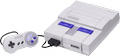
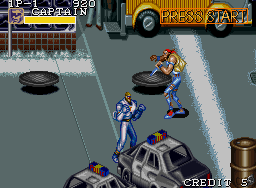
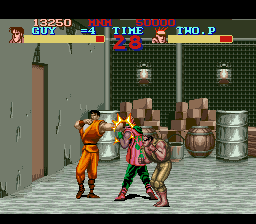
Final Fight 3, released in Japan as Final Fight Tough (Japanese: ファイナルファイト タフ, Hepburn: Fainaru Faito Tafu), is a 1995 beat 'em up video game developed and published by Capcom for the Super Nintendo Entertainment System. It is the second sequel to Final Fight released for the Super NES, following Final Fight 2. Like its predecessor, it was produced by Capcom's consumer division with no preceding arcade version released.
The game features the return of the protagonist Guy along with Haggar and also introduces new characters Lucia and Dean. The game's plot takes them through their efforts to rid Metro City of the new Skull Cross gang. Final Fight 3 introduced new moves, as well as branching paths during gameplay and multiple endings. Also available is the option to fight alongside a CPU-controlled partner. However, most critics felt these changes did too little in the way of expanding and improving upon the original Final Fight, and the game was released to little fanfare.
The next Final Fight game, Final Fight Revenge, eschewed the beat 'em up gameplay in favor of a 3D one-on-one fighting format.
From Wikipedia's article Final Fight 3
Keyboard controls
| SNES | Player 1 | Player 2 |
|---|---|---|
| D-pad | ↑↓←→ | IKJL |
| A | Z | M |
| B | X | N |
| X | A | U |
| Y | S | H |
| L | Q | Y |
| R | E | O |
| Select | Shift | B |
| Start | Enter | Space |
Hotkeys
- 1 Quick save state
- 2 Quick load state
- 3 Change save slot
Gamepads are detected when you press a button. Remap any key from the emulator’s Controls menu (gear icon).
Online, both players use the Player 1 keys (or a gamepad) on their own computer. Saving, loading and pausing are off while you play online.
From the manual, pages 4–5
Live chat
Connecting…
Keyboard controls
| SNES | Player 1 | Player 2 |
|---|---|---|
| D-pad | ↑↓←→ | IKJL |
| A | Z | M |
| B | X | N |
| X | A | U |
| Y | S | H |
| L | Q | Y |
| R | E | O |
| Select | Shift | B |
| Start | Enter | Space |
Hotkeys
- 1 Quick save state
- 2 Quick load state
- 3 Change save slot
Gamepads are detected when you press a button. Remap any key from the emulator’s Controls menu (gear icon).
Online, both players use the Player 1 keys (or a gamepad) on their own computer. Saving, loading and pausing are off while you play online.
From the manual, pages 4–5
2.5 Could be better
Critics 64 · 14 reviews
Review scorecard
- Graphics 2.5 out of 5 Overall fallback
- Sound 2.5 out of 5 Overall fallback
- Control 2.5 out of 5 Overall fallback
- Fun Factor 2.5 out of 5 Overall fallback
Overall fallback: Critics 64 · 14 reviews. Overall source The same 64/100 overall rating fills missing categories using the face scale; these are not separate category scores.
What the reviews talk about
Key wordsrepetitivedullexcitingoriginal
What the critics said
Next Generation similarly felt that the new features were not enough to make the game a significant step up from the original Final Fight, stating that "It's not dull, but it's not all that exciting either".
— Next Generation, 1995
From the Reception section of Wikipedia's Final Fight 3 article.
Scores
- 80 GamesMaster 80%
- 80 Retro Gamer 80%
- 75 Nintendo Life2010 8/10 ; 7/10
- 74 Nintendo Magazine System 74/100
- 68 Game Players 68%
- 66 GameFan 55/100, 77/100, 67/100
- 65 Game Informer 6.5/10
- 64 Total! (UK) 64/100 ; (DE) 2-
- 61 Official Nintendo Magazine 61/100
- 60 AllGame1998 3/5
- 57 Computer and Video Games 57/100
- 56 Electronic Gaming Monthly 6.5/10, 5.5/10, 5.5/10, 5/10
- 49 Super Play 49%
- 40 Next Generation 2/5
From the review table in Wikipedia's Final Fight 3 article.
Full reviews
Play online
Play with a friend on another computer. Host a room and send them the link, or list it in Open rooms for anyone to join; they play as Player 2 and you both see the same game.
Press Start Game first.
Go live
Let anyone watch you play, live in their browser. They see your game as you play it, and your online game when you host a room.
Press Start Game first.
Comments