Teenage Mutant Ninja Turtles IV: Turtles in Time

230K plays 1991 #Action#Fighting
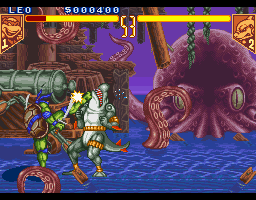
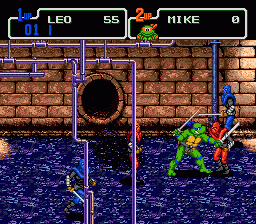
Teenage Mutant Ninja Turtles: Turtles in Time, released as Teenage Mutant Hero Turtles: Turtles in Time in Europe, is a 1991 beat 'em up game developed and published by Konami for arcades. A sequel to the original Teenage Mutant Ninja Turtles arcade game, it is a side-scrolling game based mainly on the 1987 TMNT animated series. Originally an arcade game, Turtles in Time was ported to the Super Nintendo Entertainment System in 1992 under the title Teenage Mutant Ninja Turtles IV: Turtles in Time, continuing the numbering from the earlier Turtles games released on the original NES. That same year, a game that borrowed many elements, Teenage Mutant Ninja Turtles: The Hyperstone Heist, was released for the Sega Genesis.
In 2005, the arcade version of Turtles in Time was rereleased on newer consoles. A slightly altered version of the arcade game was included as an unlockable bonus in the 2005 game Teenage Mutant Ninja Turtles 3: Mutant Nightmare. On August 5, 2009, Ubisoft released a 3D remake of the game, Teenage Mutant Ninja Turtles: Turtles in Time Re-Shelled, available as a download for Xbox 360 via Xbox Live Arcade. A downloadable PlayStation 3 version was later released via PlayStation Network on September 10, 2009.
From Wikipedia's article Teenage Mutant Ninja Turtles: Turtles in Time, licensed under CC BY-SA 4.0
Keyboard controls
| SNES | Player 1 | Player 2 |
|---|---|---|
| D-pad | ↑↓←→ | IKJL |
| A | Z | M |
| B | X | N |
| X | A | U |
| Y | S | H |
| L | Q | Y |
| R | E | O |
| Select | Shift | B |
| Start | Enter | Space |
Hotkeys
- 1 Quick save state
- 2 Quick load state
- 3 Change save slot
Gamepads are detected when you press a button. Remap any key from the emulator’s Controls menu (gear icon).
Online, both players use the Player 1 keys (or a gamepad) on their own computer. Saving, loading and pausing are off while you play online.
From the manual, page 5
Live chat
Connecting…
Keyboard controls
| SNES | Player 1 | Player 2 |
|---|---|---|
| D-pad | ↑↓←→ | IKJL |
| A | Z | M |
| B | X | N |
| X | A | U |
| Y | S | H |
| L | Q | Y |
| R | E | O |
| Select | Shift | B |
| Start | Enter | Space |
Hotkeys
- 1 Quick save state
- 2 Quick load state
- 3 Change save slot
Gamepads are detected when you press a button. Remap any key from the emulator’s Controls menu (gear icon).
Online, both players use the Player 1 keys (or a gamepad) on their own computer. Saving, loading and pausing are off while you play online.
From the manual, page 5
Play online
Play with a friend on another computer. Host a room and send them the link; they join as Player 2 and you both see the same game.
Press Start Game first.
Go live
Let anyone watch you play, live in their browser. They see your game as you play it, and your online game when you host a room.
Press Start Game first.


Comments