Yoshi’s Cookie

30K plays 1992 #Puzzle
Yoshi's Cookie is a 1992 tile-matching puzzle video game developed by Tose and published by Nintendo for the NES and Game Boy platforms in 1992. A Super NES version was released the following year, developed and published by Bullet-Proof Software.
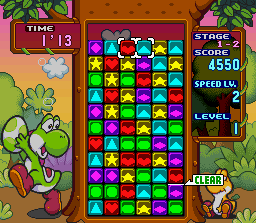
Yoshi's Cookie is a tile-matching video game in which the player is given a playing field populated with cookies of several types, arranged in a rectangular grid. The main objective of each level is to clear the playing field of all the cookies. The player mixes and matches the cookies such that entire rows or columns consist only of cookies of the same type. The player controls a cursor on the grid that is used to rotate individual lines in a manner similar to a Rubik's Cube. When a single row or column contains all matching cookies, the row is cleared from the grid. The grid grows in size from cookies entering from the top and right sides of the playing field and a game over occurs when the grid overflows. A sixth cookie type, shaped like Yoshi's head, occasionally appears that acts as a wild card, used to help clear lines of any other cookie.
Yoshi's Cookie has different game modes. In the single-player Action Mode, the player completes successive levels that progressively grow more complex. A multiplayer VS Mode has two players competing against each other in split-screen. The Super NES version has a single-player VS Mode in which the player competes against a computer player. The Super NES version also contains a Puzzle Mode in which each level has a predefined grid of cookies and player must clear all the cookies in a maximum number of moves.
Text: Wikipedia via RetroGames.cz, licensed under CC BY-SA 3.0
Keyboard controls
| SNES | Player 1 | Player 2 |
|---|---|---|
| D-pad | ↑↓←→ | IKJL |
| A | Z | M |
| B | X | N |
| X | A | U |
| Y | S | H |
| L | Q | Y |
| R | E | O |
| Select | Shift | B |
| Start | Enter | Space |
Hotkeys
- 1 Quick save state
- 2 Quick load state
- 3 Change save slot
Gamepads are detected when you press a button. Remap any key from the emulator’s Controls menu (gear icon).
Online, both players use the Player 1 keys (or a gamepad) on their own computer. Saving, loading and pausing are off while you play online.
Live chat
Connecting…
Keyboard controls
| SNES | Player 1 | Player 2 |
|---|---|---|
| D-pad | ↑↓←→ | IKJL |
| A | Z | M |
| B | X | N |
| X | A | U |
| Y | S | H |
| L | Q | Y |
| R | E | O |
| Select | Shift | B |
| Start | Enter | Space |
Hotkeys
- 1 Quick save state
- 2 Quick load state
- 3 Change save slot
Gamepads are detected when you press a button. Remap any key from the emulator’s Controls menu (gear icon).
Online, both players use the Player 1 keys (or a gamepad) on their own computer. Saving, loading and pausing are off while you play online.
Play online
Play with a friend on another computer. Host a room and send them the link; they join as Player 2 and you both see the same game.
Press Start Game first.

Comments