Pac-Attack
27K plays 1993 #Puzzle
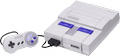
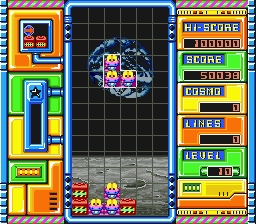
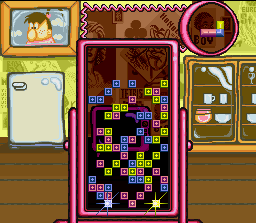
Pac-Attack, also known as Pac-Panic, is a 1993 tile-matching puzzle video game developed and published by Namco for the Super Nintendo Entertainment System. Versions for the Sega Genesis, Game Boy, Game Gear, and Philips CD-i were also released. The player is tasked with clearing out blocks and ghosts without them stacking to the top of the playfield — blocks can be cleared by matching them in horizontal rows, while ghosts can be cleared by placing down a Pac-Man piece that can eat them. It is the first Pac-Man game to be released exclusively for home platforms.
Pac-Attack is an adaptation of the 1992 game Cosmo Gang the Puzzle, which was released for arcades worldwide and for the Super Famicom in Japan. Music was composed by Hiromi Shibano, and the cover art was designed by Greg Martin. To promote the game's release, a contest was held in GameFan magazine that awarded cash prizes to players who submitted their highest scores.
Critical reception for the game was mixed; while some disliked its lack of replay value and inferiority to other games such as Tetris and Columns, others praised it for its addictiveness and clever usage of the traditional Pac-Man gameplay. It has since been ported to several systems and included in a number of Pac-Man and Namco compilations for multiple platforms. A reskin of Pac-Attack was created for the Nintendo DSi's DSiWare download service titled Korogashi Puzzle Katamari Damacy, based on the Katamari series.
From Wikipedia's article Pac-Attack
Keyboard controls
| SNES | Player 1 | Player 2 |
|---|---|---|
| D-pad | ↑↓←→ | IKJL |
| A | Z | M |
| B | X | N |
| X | A | U |
| Y | S | H |
| L | Q | Y |
| R | E | O |
| Select | Shift | B |
| Start | Enter | Space |
Hotkeys
- 1 Quick save state
- 2 Quick load state
- 3 Change save slot
Gamepads are detected when you press a button. Remap any key from the emulator’s Controls menu (gear icon).
Online, both players use the Player 1 keys (or a gamepad) on their own computer. Saving, loading and pausing are off while you play online.
From the manual, pages 6–7
Live chat
Connecting…
Keyboard controls
| SNES | Player 1 | Player 2 |
|---|---|---|
| D-pad | ↑↓←→ | IKJL |
| A | Z | M |
| B | X | N |
| X | A | U |
| Y | S | H |
| L | Q | Y |
| R | E | O |
| Select | Shift | B |
| Start | Enter | Space |
Hotkeys
- 1 Quick save state
- 2 Quick load state
- 3 Change save slot
Gamepads are detected when you press a button. Remap any key from the emulator’s Controls menu (gear icon).
Online, both players use the Player 1 keys (or a gamepad) on their own computer. Saving, loading and pausing are off while you play online.
From the manual, pages 6–7
2.5 Could be better
GameRankings 66%
Review scorecard
- Graphics 2.5 out of 5 Overall fallback
- Sound 2.5 out of 5 Overall fallback
- Control 2.5 out of 5 Overall fallback
- Fun Factor 2.5 out of 5 Overall fallback
Overall fallback: GameRankings 66%. Overall source The same 66/100 overall rating fills missing categories using the face scale; these are not separate category scores.
What the reviews talk about
Key wordssimplisticcleverresponsiveblandtediousfrustrating
What the critics said
Reviewing the iOS "demake", TouchArcade especially praised the game's Puzzle Mode for its unique gameplay, while also liking the game's "sharp" graphics and responsive controls.
— TouchArcade, 2010 · about another version
Power Unlimited gave the CD-i version a score of 80% summarizing: "The graphics are clear, the music is nice and the controls are excellent."
— Power Unlimited · about another version
From the Reception section of Wikipedia's Pac-Attack article.
Scores
- 80 GamePro1994 4/5 (SNES)
- 90 AllGame1998 4.5/5 (GG) · other versions
- 80 CD-i1995 80% (CD-i) · other versions
- 80 Power Unlimited 80% (CD-i) · other versions
- 66 Electronic Gaming Monthly 7/10, 6/10, 6/10, 7/10, 7/10 (GG) · other versions
- 60 TouchArcade2010 3/5 (iOS) · other versions
From the review table in Wikipedia's Pac-Attack article.
Full reviews
Play online
Play with a friend on another computer. Host a room and send them the link, or list it in Open rooms for anyone to join; they play as Player 2 and you both see the same game.
Press Start Game first.
Go live
Let anyone watch you play, live in their browser. They see your game as you play it, and your online game when you host a room.
Press Start Game first.
Comments