Street Fighter II Turbo: Hyper Fighting

497K plays 1992 #Action#Fighting
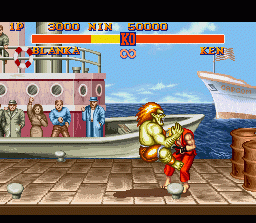
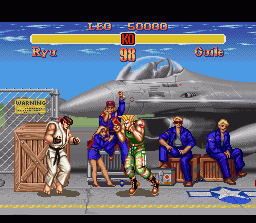
Street Fighter II Turbo: Hyper Fighting is a competitive fighting game released for the arcade by Capcom in 1992. It is the third game in the Street Fighter II sub-series of Street Fighter games following Street Fighter II: Champion Edition. Released less than a year after the previous installment, Hyper Fighting introduced a faster playing speed and new special moves for certain characters, as well as further refinement to the character balance.
Hyper Fighting features faster playing speed compared to Champion Edition. As a result, the inputs for special moves and combos requires more precise timing. The faster playing speed also allowed players to get into battle quicker, as well as to react quicker. All of the fighters, with the exception of Guile and the four Grand Masters, were each given at least one new special move. The new techniques are as follow:
Text: Wikipedia via RetroGames.cz, licensed under CC BY-SA 3.0
Keyboard controls
| SNES | Player 1 | Player 2 |
|---|---|---|
| D-pad | ↑↓←→ | IKJL |
| A | Z | M |
| B | X | N |
| X | A | U |
| Y | S | H |
| L | Q | Y |
| R | E | O |
| Select | Shift | B |
| Start | Enter | Space |
Hotkeys
- 1 Quick save state
- 2 Quick load state
- 3 Change save slot
Gamepads are detected when you press a button. Remap any key from the emulator’s Controls menu (gear icon).
Online, both players use the Player 1 keys (or a gamepad) on their own computer. Saving, loading and pausing are off while you play online.
Live chat
Connecting…
Keyboard controls
| SNES | Player 1 | Player 2 |
|---|---|---|
| D-pad | ↑↓←→ | IKJL |
| A | Z | M |
| B | X | N |
| X | A | U |
| Y | S | H |
| L | Q | Y |
| R | E | O |
| Select | Shift | B |
| Start | Enter | Space |
Hotkeys
- 1 Quick save state
- 2 Quick load state
- 3 Change save slot
Gamepads are detected when you press a button. Remap any key from the emulator’s Controls menu (gear icon).
Online, both players use the Player 1 keys (or a gamepad) on their own computer. Saving, loading and pausing are off while you play online.
Play online
Play with a friend on another computer. Host a room and send them the link; they join as Player 2 and you both see the same game.
Press Start Game first.

Comments