Street Fighter II

3.5M plays 1992 #Action#Fighting
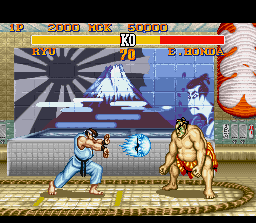
Street Fighter II: The World Warrior is a 1991 fighting game developed and published by Capcom for arcades. It is the second installment in the Street Fighter series and the sequel to 1987's Street Fighter. Designed by Yoshiki Okamoto and Akira Yasuda, who had previously worked on the game Final Fight, it is the fourteenth game to use Capcom's CP System arcade system board. Street Fighter II vastly improved many of the concepts introduced in the first game, including the use of special command-based moves, a combo system, a six-button configuration, and a wider selection of playable characters, each with a unique fighting style.
Street Fighter II became the best-selling game since the golden age of arcade video games. By 1994, it had been played by an estimated 25 million people in the United States alone. More than 200,000 arcade cabinets and 15 million software units of every version of Street Fighter II have been sold worldwide, earning an estimated $10 billion in revenue, making it one of the top three highest-grossing video games of all time as of 2017 and the best-selling fighting game until 2019; estimated to be approximately £260(~$350) million in arcades in the UK alone. More than 6.3 million SNES cartridges of Street Fighter II were sold, making it Capcom's best-selling single software game for the next 20 years, its best-selling game on a single platform, and the highest-selling third-party game on the SNES.
From Wikipedia's article Street Fighter II, licensed under CC BY-SA 4.0
Keyboard controls
| SNES | Player 1 | Player 2 |
|---|---|---|
| D-pad | ↑↓←→ | IKJL |
| A | Z | M |
| B | X | N |
| X | A | U |
| Y | S | H |
| L | Q | Y |
| R | E | O |
| Select | Shift | B |
| Start | Enter | Space |
Hotkeys
- 1 Quick save state
- 2 Quick load state
- 3 Change save slot
Gamepads are detected when you press a button. Remap any key from the emulator’s Controls menu (gear icon).
Online, both players use the Player 1 keys (or a gamepad) on their own computer. Saving, loading and pausing are off while you play online.
Live chat
Connecting…
Keyboard controls
| SNES | Player 1 | Player 2 |
|---|---|---|
| D-pad | ↑↓←→ | IKJL |
| A | Z | M |
| B | X | N |
| X | A | U |
| Y | S | H |
| L | Q | Y |
| R | E | O |
| Select | Shift | B |
| Start | Enter | Space |
Hotkeys
- 1 Quick save state
- 2 Quick load state
- 3 Change save slot
Gamepads are detected when you press a button. Remap any key from the emulator’s Controls menu (gear icon).
Online, both players use the Player 1 keys (or a gamepad) on their own computer. Saving, loading and pausing are off while you play online.
Play online
Play with a friend on another computer. Host a room and send them the link; they join as Player 2 and you both see the same game.
Press Start Game first.
Go live
Let anyone watch you play, live in their browser. They see your game as you play it, and your online game when you host a room.
Press Start Game first.
Comments