Tecmo Cup: Soccer Game

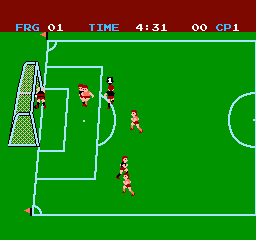
Tecmo Cup Soccer Game, known as Captain Tsubasa in Japan and Tecmo Cup Football Game in Europe, is an association football sports video game for the Nintendo Entertainment System. Released in 1992 by Tecmo, the objective of the game is fighting your way from junior league all the way to the finals of World Cup. The game is based on the Captain Tsubasa manga series. Tecmo Cup Soccer Game is a heavily Americanized version of the Japanese Captain Tsubasa game released for the Family Computer system, featuring a different main character, a different introduction and more western-looking players. The game contains elements from role-playing games as the players have skill levels and are mostly controlled by different kinds of text commands.
Considered to be the first of many games based on the series, which have appeared on many systems, this game was the innovator of games that would be known as 'Cinematic Soccer'. Rather than having direct control over the action like a standard soccer sim; the game has a cinematic angle with the player having to choose his actions from a timed list and the results of these actions are animated on screen. Present-day games with a 'career mode' setting would be inspired by this game's setup.
Robin Field loves soccer. He aims to be the best player in the world with the help of his dad (who was former top player) and his little brother Cecil. After successful domestic league campaign, Robin continues his career in the 'Tops', which consist of best players seen in the domestic league. Tops participate in the Tecmo Cup, the youth World Cup with best players from around the world. Tecmo Cup is a soccer simulator combined with RPG elements. As the game progress, Robin and his teammates will get better. The matches themselves consist of numerous choices what to do at each moment. If you are attacking, you have options to pass, shoot or to dribble. And when you are defending, you can either tackle, cut pass/shoot, or mark the opposition player with ball.
Text: Wikipedia via RetroGames.cz, licensed under CC BY-SA 3.0
Keyboard controls
| NES | Player 1 | Player 2 |
|---|---|---|
| D-pad | ↑↓←→ | IKJL |
| B | Z | N |
| A | X | M |
| Select | Shift | B |
| Start | Enter | Space |
Hotkeys
- 1 Quick save state
- 2 Quick load state
- 3 Change save slot
Gamepads are detected when you press a button. Remap any key from the emulator’s Controls menu (gear icon).
Live chat
Connecting…
Keyboard controls
| NES | Player 1 | Player 2 |
|---|---|---|
| D-pad | ↑↓←→ | IKJL |
| B | Z | N |
| A | X | M |
| Select | Shift | B |
| Start | Enter | Space |
Hotkeys
- 1 Quick save state
- 2 Quick load state
- 3 Change save slot
Gamepads are detected when you press a button. Remap any key from the emulator’s Controls menu (gear icon).
Comments