Spitfire Attack

7.4K plays 1983 #Action#Shooter#Simulation
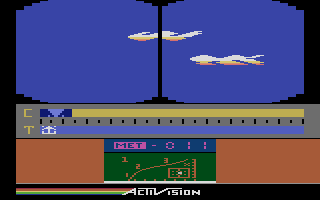
Spitfire Attack is a 1983 aerial combat game developed and published by Milton Bradley for the Atari 2600. Set during World War II, players control a British Spitfire fighter tasked with destroying enemy targets both on the ground and in the air. Enemy planes are the primary threat, requiring quick reflexes in dogfights, while ground targets like weapons depots and anti-aircraft guns provide additional points and hazards. The game features a cockpit-style forward-scrolling perspective, offering a rare pseudo-3D experience for the system.
Although originally bundled with a special “Flight Commander” joystick—a flight stick meant to simulate aircraft controls—the game is fully compatible with the standard Atari joystick. This accessibility broadened its appeal and ensured players weren’t limited by hardware. Managing fuel, dodging enemy fire, and successfully engaging moving targets make the gameplay intense and surprisingly nuanced for a 2600 title.
Spitfire Attack was released in the same year as Air Raiders, another first-person aerial shooter for the Atari 2600. While both games aimed to deliver immersive dogfight experiences, Spitfire Attack stood out with its hybrid focus on both air and ground targets, as well as its optional advanced controller. Critics at the time were divided—some applauded the innovation and ambition, while others pointed to repetitive gameplay and control issues, especially with the Flight Commander stick.
Today, Spitfire Attack is remembered as a bold experiment in expanding the capabilities of the Atari 2600. Its combination of air combat, strategic bombing, and peripheral experimentation places it among the more unique—and collectible—titles of its era. Alongside games like Air Raiders, it represents an early push toward immersive flight simulation on home consoles.
Text: RetroGames.cz, licensed under CC BY-SA 3.0
Keyboard controls
| Atari 2600 | Player 1 | Player 2 |
|---|---|---|
| D-pad | ↑↓←→ | IKJL |
| Fire | Z | N |
| Game Select | Shift | |
| Game Reset | Enter |
Hotkeys
- 1 Quick save state
- 2 Quick load state
- 3 Change save slot
Most games start with Game Reset. Paddle games (Breakout, Kaboom!…) need a gamepad stick.
Gamepads are detected when you press a button. Remap any key from the emulator’s Controls menu (gear icon).
Live chat
Connecting…
Keyboard controls
| Atari 2600 | Player 1 | Player 2 |
|---|---|---|
| D-pad | ↑↓←→ | IKJL |
| Fire | Z | N |
| Game Select | Shift | |
| Game Reset | Enter |
Hotkeys
- 1 Quick save state
- 2 Quick load state
- 3 Change save slot
Most games start with Game Reset. Paddle games (Breakout, Kaboom!…) need a gamepad stick.
Gamepads are detected when you press a button. Remap any key from the emulator’s Controls menu (gear icon).



















Comments