IronSword: Wizards & Warriors II

8.5K plays 1989 #Action#Platform
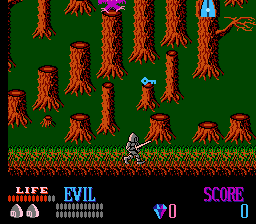
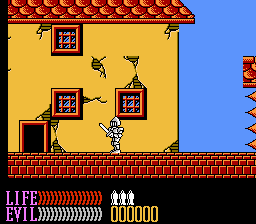
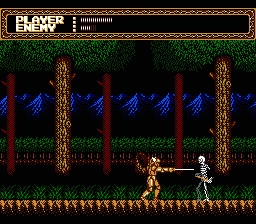
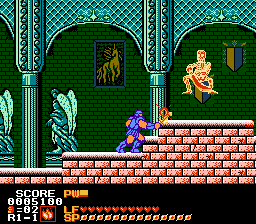
Ironsword: Wizards & Warriors II (also known as Wizards and Warriors II: Ironsword) is an action platform video game developed by Zippo Games and published by Acclaim Entertainment for the Nintendo Entertainment System. It was released in North America in December 1989 and in Europe on 27 March 1991. It is the sequel to Rare's 1987 title Wizards & Warriors. In Ironsword, the player controls the knight warrior Kuros as he ventures in the land of Sindarin. He must defeat the evil wizard Malkil, who has assumed the elemental forms of Earth, Wind, Fire, and Water. Kuros must collect the parts of and assemble the legendary "IronSword" in order to defeat Malkil, who resides at the top of IceFire Mountain.
The game was fairly well-received, selling 500,000 copies in North America and 50,000 copies in Europe. It received praise for its size, graphics and sound, detailed characters and bosses, and gameplay, with criticism for its lack of originality. Rare responded positively to the game, which led to Zippo Games being contracted to develop games for Rare such as Solar Jetman: Hunt for the Golden Warpship and Wizards & Warriors III: Kuros: Visions of Power, eventually being folded into the company as Rare Manchester.
From Wikipedia's article Ironsword: Wizards & Warriors II
Keyboard controls
| NES | Player 1 | Player 2 |
|---|---|---|
| D-pad | ↑↓←→ | IKJL |
| B | Z | N |
| A | X | M |
| Select | Shift | B |
| Start | Enter | Space |
Hotkeys
- 1 Quick save state
- 2 Quick load state
- 3 Change save slot
Gamepads are detected when you press a button. Remap any key from the emulator’s Controls menu (gear icon).
Online, both players use the Player 1 keys (or a gamepad) on their own computer. Saving, loading and pausing are off while you play online.
From the manual, pages 4–5
Live chat
Connecting…
Keyboard controls
| NES | Player 1 | Player 2 |
|---|---|---|
| D-pad | ↑↓←→ | IKJL |
| B | Z | N |
| A | X | M |
| Select | Shift | B |
| Start | Enter | Space |
Hotkeys
- 1 Quick save state
- 2 Quick load state
- 3 Change save slot
Gamepads are detected when you press a button. Remap any key from the emulator’s Controls menu (gear icon).
Online, both players use the Player 1 keys (or a gamepad) on their own computer. Saving, loading and pausing are off while you play online.
From the manual, pages 4–5
3.5 Good job
Critics 76 · 2 reviews
Review scorecard
- Graphics 3.5 out of 5 Overall fallback
- Sound 3.5 out of 5 Overall fallback
- Control 3.5 out of 5 Overall fallback
- Fun Factor 3.5 out of 5 Overall fallback
Overall fallback: Critics 76 · 2 reviews. Overall source The same 76/100 overall rating fills missing categories using the face scale; these are not separate category scores.
What the reviews talk about
Key wordseeriepreciseblandoriginalfundetailed
What the critics said
They concluded that Ironsword was "one of the most welcome Nintendo Entertainment System games in a long time".
— Electronic Gaming Monthly, 1989
He also noted that "Fabio's bare-breasted likeness smoldering on IronSword's cover art that made this game a smash hit with kids and moms alike".
— IGN
Website GamesRadar praised the game's music, especially the title theme; Brett Elston said it set a serious tone for the game, saying "its heavy, droning beats mix with a fantasy-minded melody that make it sound like a funeral dirge in the Shire".
— GamesRadar+, 2010
GameSpy listed it as the 4th worst video game cover in history, saying that "thanks to the presence of Fabio on the cover, gamers got confused and thought they had accidentally picked up one of their mom's romance novels".
— GameSpy, 2003
In a retrospective of the NES for the console's 25th anniversary, Nintendo Power wrote that "the game's quality will be forever overshadowed by Acclaim's choice of Fabio as the cover model".
— Nintendo Power, 2010
From the Reception section of Wikipedia's Ironsword: Wizards & Warriors II article.
Scores
- 77 Mean Machines 77% ;
- 75 Electronic Gaming Monthly 8/8/7/7
From the review table in Wikipedia's Ironsword: Wizards & Warriors II article.
Full reviews
Play online
Play with a friend on another computer. Host a room and send them the link, or list it in Open rooms for anyone to join; they play as Player 2 and you both see the same game.
Press Start Game first.
Go live
Let anyone watch you play, live in their browser. They see your game as you play it, and your online game when you host a room.
Press Start Game first.
Comments