Castlevania

643K plays 1986 #Action#Platform
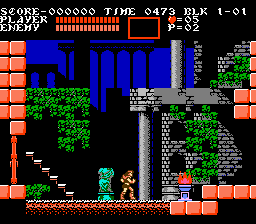
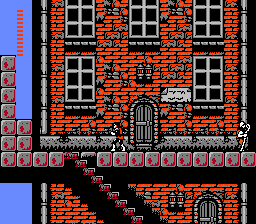
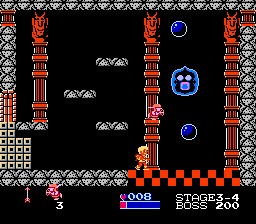
Castlevania, known in Japan as Akumajō Dracula, is a 1986 platform game developed and published by Konami. It was originally released in Japan for the Famicom Disk System in September 1986, before being ported to cartridge format and released in North America for the Nintendo Entertainment System (NES) in 1987 and in Europe in 1988. It was also re-issued for the Family Computer in cartridge format in 1993. It is the first installment in the Castlevania series.
Players control Simon Belmont, descendant of a legendary vampire hunter, who enters the castle of Count Dracula to destroy him when he suddenly reappears 100 years after Simon's ancestor vanquished him. Castlevania was developed in tandem with Konami's MSX2 game Vampire Killer, which was released a month later and uses the same premise, characters and settings, but features different gameplay mechanics. It was followed by a sequel, Castlevania II: Simon's Quest, and a prequel, Castlevania III: Dracula's Curse, both of which were also released for the NES. Super Castlevania IV was released in 1991 for the Super NES and follows the same story. A remake for the X68000 was released in 1993, and was later re-released for the PlayStation as Castlevania Chronicles in 2001.
Castlevania was a commercial success and received critical acclaim, with journalists praising its graphics, gameplay, music, and difficulty. It has since been considered one of the greatest video games ever made.
From Wikipedia's article Castlevania (1986 video game)
Keyboard controls
| NES | Player 1 | Player 2 |
|---|---|---|
| D-pad | ↑↓←→ | IKJL |
| B | Z | N |
| A | X | M |
| Select | Shift | B |
| Start | Enter | Space |
Hotkeys
- 1 Quick save state
- 2 Quick load state
- 3 Change save slot
Gamepads are detected when you press a button. Remap any key from the emulator’s Controls menu (gear icon).
Online, both players use the Player 1 keys (or a gamepad) on their own computer. Saving, loading and pausing are off while you play online.
From the manual, page 3
Live chat
Connecting…
Keyboard controls
| NES | Player 1 | Player 2 |
|---|---|---|
| D-pad | ↑↓←→ | IKJL |
| B | Z | N |
| A | X | M |
| Select | Shift | B |
| Start | Enter | Space |
Hotkeys
- 1 Quick save state
- 2 Quick load state
- 3 Change save slot
Gamepads are detected when you press a button. Remap any key from the emulator’s Controls menu (gear icon).
Online, both players use the Player 1 keys (or a gamepad) on their own computer. Saving, loading and pausing are off while you play online.
From the manual, page 3
3.5 Good job
Critics 76 · 2 reviews
Review scorecard
- Graphics 3.5 out of 5 Overall fallback
- Sound 3.5 out of 5 Overall fallback
- Control 3.5 out of 5 Overall fallback
- Fun Factor 3.5 out of 5 Overall fallback
Overall fallback: Critics 76 · 2 reviews. Overall source The same 76/100 overall rating fills missing categories using the face scale; these are not separate category scores.
What the reviews talk about
Key wordsmonotonousoriginalshortrealistic
What the critics said
Computer and Video Games gave it a positive review in 1989, praising the "huge playing area and lots of neat touches" that would "keep you engrossed for weeks."
— Computer and Video Games
They criticized the "gaudy graphics" but said "it's the gameplay that counts, and it's great!"
— Computer and Video Games, 1989
IGN's Lucas M. Thomas noted the relative realism of Castlevania's weapons versus "glowing flowers that let you throw bouncing fireballs."
— IGN (Lucas M. Thomas)
Game Informer's Tim Turi claimed that the original Castlevania made the series a "legend" and called it the "essential Castlevania experience."
— Game Informer, 2012 (Tim Turi)
From the Reception section of Wikipedia's Castlevania (1986 video game) article.
Scores
- 80 Computer and Video Games1989 NES: 80%
- 71 GameSpot Wii VC: 7.1/10
- 85 Famitsu1986 FDS: 8/10, 8/10, 9/10, 9/10 · other versions
- 80 Beep1986 FDS: 4/5 · other versions
From the review table in Wikipedia's Castlevania (1986 video game) article.
Full reviews
Play online
Play with a friend on another computer. Host a room and send them the link, or list it in Open rooms for anyone to join; they play as Player 2 and you both see the same game.
Press Start Game first.
Go live
Let anyone watch you play, live in their browser. They see your game as you play it, and your online game when you host a room.
Press Start Game first.
Comments