Prince of Persia

3.7M plays 1989 #Action#Platform
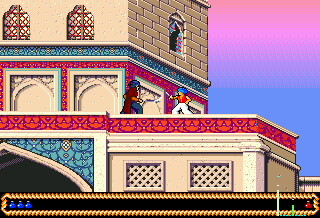
Prince of Persia is a 1989 cinematic platform game developed and published by Broderbund for the Apple II. It was designed and implemented by Jordan Mechner. Taking place in medieval Persia, players control an unnamed protagonist who must venture through a series of dungeons to defeat the evil Grand Vizier Jaffar and save an imprisoned princess.
Much like Karateka, Mechner's first video game, Prince of Persia used rotoscoping for its fluid and realistic animation. For this process, Mechner used as reference for the characters' movements videos of his brother doing acrobatic stunts in white clothes and swashbuckler films such as The Adventures of Robin Hood.
The game was critically acclaimed and, while not an immediate commercial success, sold many copies as it was ported to a wide range of platforms after the original Apple II release. It is believed to have been the first cinematic platformer and inspired many games in this subgenre, such as Another World. Its success launched the Prince of Persia franchise, consisting of two sequels, Prince of Persia 2: The Shadow and the Flame (1993) and Prince of Persia 3D (1999), and two reboots: Prince of Persia: The Sands of Time (2003), which was followed by three sequels of its own, and Prince of Persia (2008).
From Wikipedia's article Prince of Persia (1989 video game)
Keyboard controls
| NES | Player 1 | Player 2 |
|---|---|---|
| D-pad | ↑↓←→ | IKJL |
| B | Z | N |
| A | X | M |
| Select | Shift | B |
| Start | Enter | Space |
Hotkeys
- 1 Quick save state
- 2 Quick load state
- 3 Change save slot
Gamepads are detected when you press a button. Remap any key from the emulator’s Controls menu (gear icon).
Online, both players use the Player 1 keys (or a gamepad) on their own computer. Saving, loading and pausing are off while you play online.
From the manual, page 7
Live chat
Connecting…
Keyboard controls
| NES | Player 1 | Player 2 |
|---|---|---|
| D-pad | ↑↓←→ | IKJL |
| B | Z | N |
| A | X | M |
| Select | Shift | B |
| Start | Enter | Space |
Hotkeys
- 1 Quick save state
- 2 Quick load state
- 3 Change save slot
Gamepads are detected when you press a button. Remap any key from the emulator’s Controls menu (gear icon).
Online, both players use the Player 1 keys (or a gamepad) on their own computer. Saving, loading and pausing are off while you play online.
From the manual, page 7
5.0 Outstanding!
Critics 91 · 4 reviews (other versions)
From reviews of other versions of the game (none of this one found).
Review scorecard
- Graphics 5.0 out of 5 Overall fallback
- Sound 5.0 out of 5 Overall fallback
- Control 5.0 out of 5 Overall fallback
- Fun Factor 5.0 out of 5 Overall fallback
Overall fallback: Critics 91 · 4 reviews (other versions). Overall source The same 91/100 overall rating fills missing categories using the face scale; these are not separate category scores. From reviews of other versions of the game.
What the reviews talk about
Key wordsfluidexcellentchallengingdifficult
What the critics said
Charles Ardai of Computer Gaming World wrote that the game package's claim that it "breaks new ground with animation so uncannily human it must be seen to be believed" was true.
— Computer Gaming World (Charles Ardai)
In 1996, Computer Gaming World named Prince of Persia the 84th best game ever, with the editors calling it "an acrobatic platformer with amazingly fluid action".
— Computer Gaming World, 1996
Electronic Gaming Monthly (EGM) likewise assessed the Genesis version as "an excellent conversion of the classic action game", and added that the game's challenging strategy and technique give it high longevity.
— Electronic Gaming Monthly, 1994 · about another version
From the Reception section of Wikipedia's Prince of Persia (1989 video game) article.
Scores
- 100 Dragon 5/5 · other versions
- 92 Mean Machines1992 91%; 93% · other versions
- 90 Génération 42015 90% · other versions
- 80 Electronic Gaming Monthly 32/40 · other versions
From the review table in Wikipedia's Prince of Persia (1989 video game) article.
Full reviews
Play online
Play with a friend on another computer. Host a room and send them the link, or list it in Open rooms for anyone to join; they play as Player 2 and you both see the same game.
Press Start Game first.
Go live
Let anyone watch you play, live in their browser. They see your game as you play it, and your online game when you host a room.
Press Start Game first.
Comments