Super Mario World 2: Yoshi's Island

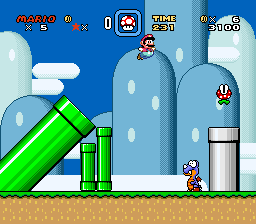
Super Mario World 2: Yoshi's Island is a 1995 platform game developed and published by Nintendo for the Super Nintendo Entertainment System (SNES). The player controls Yoshi dinosaurs on their quest to reunite baby Mario with his brother Luigi, who has been kidnapped by the wizard Kamek. Yoshi runs and jumps to reach the end of each level while solving puzzles and collecting items with Mario's help.
Having introduced the character in the previous Super Mario game, Super Mario World (1990), Nintendo decided to develop a game starring Yoshi, with the aim of making it more accessible. Yoshi's Island introduced his signature flutter jump and egg-spawning abilities. The marker-drawn art style was created by scanning hand-drawn pictures and approximating them pixel-by-pixel. Some special effects were powered by a new Super FX2 microchip.
After four years of development, Yoshi's Island was released in Japan in August 1995 and worldwide two months later. It sold more than four million copies. Critics described it as one of the greatest video games of all time, praising the art, sound, level design and gameplay. The art style and Yoshi's signature characteristics established the Yoshi series of spin-offs and sequels.
From Wikipedia's article Yoshi's Island, licensed under CC BY-SA 4.0
Keyboard controls
| SNES | Player 1 | Player 2 |
|---|---|---|
| D-pad | ↑↓←→ | IKJL |
| A | Z | M |
| B | X | N |
| X | A | U |
| Y | S | H |
| L | Q | Y |
| R | E | O |
| Select | Shift | B |
| Start | Enter | Space |
Hotkeys
- 1 Quick save state
- 2 Quick load state
- 3 Change save slot
Gamepads are detected when you press a button. Remap any key from the emulator’s Controls menu (gear icon).
Online, both players use the Player 1 keys (or a gamepad) on their own computer. Saving, loading and pausing are off while you play online.
Live chat
Connecting…
Keyboard controls
| SNES | Player 1 | Player 2 |
|---|---|---|
| D-pad | ↑↓←→ | IKJL |
| A | Z | M |
| B | X | N |
| X | A | U |
| Y | S | H |
| L | Q | Y |
| R | E | O |
| Select | Shift | B |
| Start | Enter | Space |
Hotkeys
- 1 Quick save state
- 2 Quick load state
- 3 Change save slot
Gamepads are detected when you press a button. Remap any key from the emulator’s Controls menu (gear icon).
Online, both players use the Player 1 keys (or a gamepad) on their own computer. Saving, loading and pausing are off while you play online.
No reviews yet
We found no critic scores for this game, and too few players have rated it.
Review scorecard
- Graphics — Not scored Unavailable
- Sound — Not scored Unavailable
- Control — Not scored Unavailable
- Fun Factor — Not scored Unavailable
No category score or overall rating is available for the unscored slots.
Full reviews
Play online
Play with a friend on another computer. Host a room and send them the link, or list it in Open rooms for anyone to join; they play as Player 2 and you both see the same game.
Press Start Game first.
Go live
Let anyone watch you play, live in their browser. They see your game as you play it, and your online game when you host a room.
Press Start Game first.
Comments