Prehistorik Man

119K plays 1995 #Action#Platform
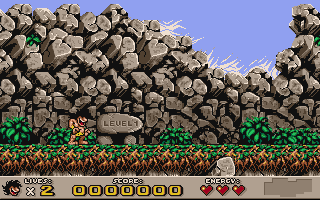
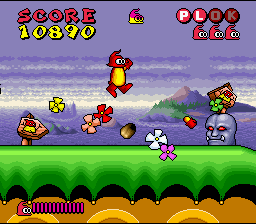
Prehistorik Man is a platform video game developed and published by Titus Interactive for the Super Nintendo Entertainment System. It is a sequel to Prehistorik 2, featuring similar graphics but a richer and different story, and additional non-player characters which, among other things, provide hints and a tutorial.
The game was later released for the Game Boy Advance and the Nintendo DSi (as a DSiWare release), with the latter being released in North America in February 2010. Prehistorik Man was added to the Nintendo Classics service in February 2021.
The Super NES version received positive reviews from critics with the story, sound and gameplay being praised. The Game Boy Advance and DSiware ports, however, have gotten mixed reviews.
From Wikipedia's article Prehistorik Man, licensed under CC BY-SA 4.0
Keyboard controls
| SNES | Player 1 | Player 2 |
|---|---|---|
| D-pad | ↑↓←→ | IKJL |
| A | Z | M |
| B | X | N |
| X | A | U |
| Y | S | H |
| L | Q | Y |
| R | E | O |
| Select | Shift | B |
| Start | Enter | Space |
Hotkeys
- 1 Quick save state
- 2 Quick load state
- 3 Change save slot
Gamepads are detected when you press a button. Remap any key from the emulator’s Controls menu (gear icon).
Online, both players use the Player 1 keys (or a gamepad) on their own computer. Saving, loading and pausing are off while you play online.
Live chat
Connecting…
Keyboard controls
| SNES | Player 1 | Player 2 |
|---|---|---|
| D-pad | ↑↓←→ | IKJL |
| A | Z | M |
| B | X | N |
| X | A | U |
| Y | S | H |
| L | Q | Y |
| R | E | O |
| Select | Shift | B |
| Start | Enter | Space |
Hotkeys
- 1 Quick save state
- 2 Quick load state
- 3 Change save slot
Gamepads are detected when you press a button. Remap any key from the emulator’s Controls menu (gear icon).
Online, both players use the Player 1 keys (or a gamepad) on their own computer. Saving, loading and pausing are off while you play online.
Play online
Play with a friend on another computer. Host a room and send them the link; they join as Player 2 and you both see the same game.
Press Start Game first.
Go live
Let anyone watch you play, live in their browser. They see your game as you play it, and your online game when you host a room.
Press Start Game first.

Comments