Spy Hunter

132K plays 1983 #Racing#Shooter
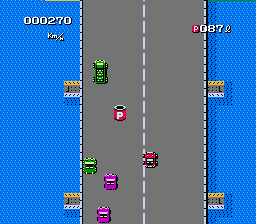
Spy Hunter is a 1983 vehicular combat video game developed and published by Bally Midway for arcades. The game draws inspiration from the James Bond films and was originally supposed to carry the James Bond brand. The object of the game is to drive down roads in the technologically advanced "Interceptor" car and destroy various enemy vehicles with a variety of onboard weapons. The game was produced in both sit-down and standard upright versions, with the latter being more common. The controls consist of a steering wheel in the form of a futuristic aircraft-style yoke with several special-purpose buttons, a two-position stick shift (offering "low" and "high" gears), and a pedal used for acceleration.
Spy Hunter was a commercial success in American arcades, where it was one of the top five highest-grossing arcade games of 1984 and 1985. It was ported to the Atari 2600, Atari 8-bit computers, Amstrad CPC, ZX Spectrum, Commodore 64, Apple II, ColecoVision, MS-DOS, Nintendo Entertainment System, and BBC Micro. Spy Hunter was followed by Spy Hunter II, which added a 3D view and two-player split-screen play, a pinball tie-in, and a successor series of games bearing the Spy Hunter name. In addition, the NES received a sequel titled Super Spy Hunter.
From Wikipedia's article Spy Hunter, licensed under CC BY-SA 4.0
Keyboard controls
| NES | Player 1 | Player 2 |
|---|---|---|
| D-pad | ↑↓←→ | IKJL |
| B | Z | N |
| A | X | M |
| Select | Shift | B |
| Start | Enter | Space |
Hotkeys
- 1 Quick save state
- 2 Quick load state
- 3 Change save slot
Gamepads are detected when you press a button. Remap any key from the emulator’s Controls menu (gear icon).
Live chat
Connecting…
Keyboard controls
| NES | Player 1 | Player 2 |
|---|---|---|
| D-pad | ↑↓←→ | IKJL |
| B | Z | N |
| A | X | M |
| Select | Shift | B |
| Start | Enter | Space |
Hotkeys
- 1 Quick save state
- 2 Quick load state
- 3 Change save slot
Gamepads are detected when you press a button. Remap any key from the emulator’s Controls menu (gear icon).
Comments