Super Sprint

83K plays 1986 #Racing
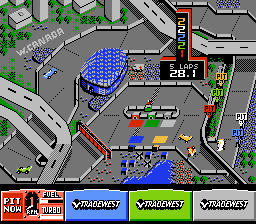
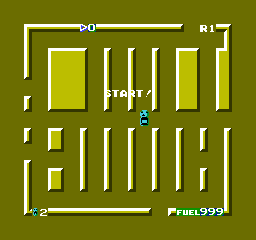
Super Sprint is a 1986 racing video game developed and published by Atari Games for arcades. Up to three players drive Formula One-like cars on a circuit that is viewed from above. The game is a successor to Gran Trak 10 and the Sprint series, which were originally produced by Atari, Inc. during the 1970s. Later in 1986, the game was revised and re-released as Championship Sprint with different tracks; this version was ported to the Amstrad CPC, Atari ST, Commodore 64 and ZX Spectrum in 1987. The 1990 game Badlands adds vehicular combat to Super Sprint-style racing.
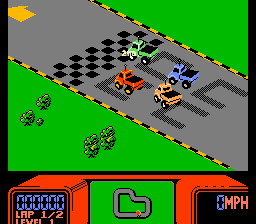
Up to three players drive simultaneously on a circuit against opponents controlled by the computer. The circuits are viewed from above and always fit on the screen, so the game never scrolls. After three laps, the winner advances to the next circuit. There are eight circuits in total, but the game only ends if the player can reach race 85, where the bonus Super Speedway circuit is played. As the player advances to higher levels, more and more obstacles appear on the track, like oil puddles and miniature tornadoes. If the car touches them, the player loses control for a short time. Driving into a wall at high speed or falling from one of the bridges destroys the car, but a helicopter will appear and replace it.
The car can be customized by collecting wrenches that lie on the track. The player can exchange three of them for improved traction, better acceleration or higher top speed.
Super Sprint was ported to the Amstrad CPC, Atari ST, Commodore 64 and ZX Spectrum in 1987 by British publisher Electric Dreams Software. An unlicensed port was released in 1989 by Tengen, a subsidiary of Atari, for the Nintendo Entertainment System; it was adapted by Japanese company Altron as a licensed title for the Japanese market in 1991.
The game was ported to the Atari 2600 under the name Sprint Master in 1988.
Text: Wikipedia via RetroGames.cz, licensed under CC BY-SA 3.0
Keyboard controls
| NES | Player 1 | Player 2 |
|---|---|---|
| D-pad | ↑↓←→ | IKJL |
| B | Z | N |
| A | X | M |
| Select | Shift | B |
| Start | Enter | Space |
Hotkeys
- 1 Quick save state
- 2 Quick load state
- 3 Change save slot
Gamepads are detected when you press a button. Remap any key from the emulator’s Controls menu (gear icon).
Live chat
Connecting…
Keyboard controls
| NES | Player 1 | Player 2 |
|---|---|---|
| D-pad | ↑↓←→ | IKJL |
| B | Z | N |
| A | X | M |
| Select | Shift | B |
| Start | Enter | Space |
Hotkeys
- 1 Quick save state
- 2 Quick load state
- 3 Change save slot
Gamepads are detected when you press a button. Remap any key from the emulator’s Controls menu (gear icon).

Comments