Duck Hunt

667K plays 1984 #Action#Shooter
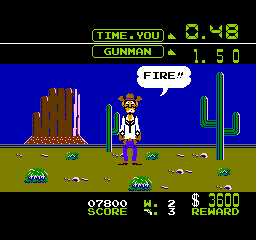
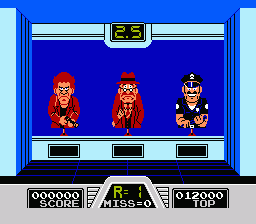
Duck Hunt is a 1984 light gun shooter video game developed and published by Nintendo for the Nintendo Entertainment System (NES). The game was first released in April 1984 in Japan for the Family Computer (Famicom) console and in North America as an arcade game for the Nintendo VS. System. It became a launch game for the NES in North America in October 1985, and was re-released in Europe two years later. Players fire the NES Zapper at a CRT television, with three attempts per round to shoot ducks and clay pigeons.
The game initially received a positive reception in the mid-1980s, but was later given mild praise in retrospective reviews. The game was inspired by Nintendo's previous electro-mechanical arcade game which was based on the Laser Clay Shooting System released in 1976. Upon release as a video game, Duck Hunt became a major commercial success both for arcades and consoles in the 1980s, helping to popularize light gun video games with over 28 million copies sold worldwide.
In 1986, the US nationwide launch of the NES included the Deluxe Set bundle with pack-in games Duck Hunt and Gyromite. The later Action Set has Duck Hunt and Super Mario Bros. on one cartridge. The final Duck Hunt bundle is the Power Set, with a multi-cart with World Class Track Meet, Super Mario Bros., and Duck Hunt. The game was released on Virtual Console for the Wii U in 2014.
From Wikipedia's article Duck Hunt
Keyboard controls
| NES | Player 1 | Player 2 |
|---|---|---|
| D-pad | ↑↓←→ | IKJL |
| B | Z | N |
| A | X | M |
| Select | Shift | B |
| Start | Enter | Space |
Hotkeys
- 1 Quick save state
- 2 Quick load state
- 3 Change save slot
Gamepads are detected when you press a button. Remap any key from the emulator’s Controls menu (gear icon).
Online, both players use the Player 1 keys (or a gamepad) on their own computer. Saving, loading and pausing are off while you play online.
From the manual, pages 4–5
Live chat
Connecting…
Keyboard controls
| NES | Player 1 | Player 2 |
|---|---|---|
| D-pad | ↑↓←→ | IKJL |
| B | Z | N |
| A | X | M |
| Select | Shift | B |
| Start | Enter | Space |
Hotkeys
- 1 Quick save state
- 2 Quick load state
- 3 Change save slot
Gamepads are detected when you press a button. Remap any key from the emulator’s Controls menu (gear icon).
Online, both players use the Player 1 keys (or a gamepad) on their own computer. Saving, loading and pausing are off while you play online.
From the manual, pages 4–5
2.5 Could be better
AllGame 3/5 · 1 review
Review scorecard
- Graphics 2.5 out of 5 Overall fallback
- Sound 2.5 out of 5 Overall fallback
- Control 2.5 out of 5 Overall fallback
- Fun Factor 2.5 out of 5 Overall fallback
Overall fallback: AllGame 3/5 · 1 review. Overall source The same 60/100 overall rating fills missing categories using the face scale; these are not separate category scores.
What the reviews talk about
Key wordsmemorableshortrepetitivefun
What the critics said
He said that Duck Hunt and Hogan's Alley "sported simulated handguns on a wire cable and pop, pop, pop, you do your thing just like in the old days only at video targets".
— RePlay, 1985
AllGame called the game an "attractive but repetitive target shooter" and "utterly mindless... the game is fun for a short time, but gets old after a few rounds of play".
— AllGame
From the Reception section of Wikipedia's Duck Hunt article.
Scores
- 60 AllGame 3/5
- 75 Nintendo World Report2015 7.5/10 (Wii U) · other versions
From the review table in Wikipedia's Duck Hunt article.
Full reviews
Play online
Play with a friend on another computer. Host a room and send them the link, or list it in Open rooms for anyone to join; they play as Player 2 and you both see the same game.
Press Start Game first.
Go live
Let anyone watch you play, live in their browser. They see your game as you play it, and your online game when you host a room.
Press Start Game first.
Comments