Spear of Destiny
187K plays 1992 #Action#Shooter
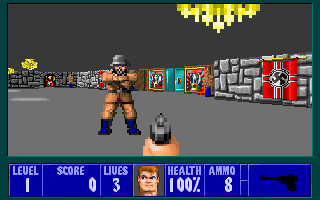
Spear of Destiny, often also called Spear, Wolfenstein 3D: Spear of Destiny or just SoD, is a 1992 first-person shooter computer game developed by id Software and published by FormGen Corporation, and is the prequel to id Software's Wolfenstein 3D. As in Wolfenstein 3D, the player assumes the role of allied spy William 'B.J.' Blazkowicz, on a mission trying to recapture the Spear of Destiny from the Nazis after it was stolen from Versailles.
It used the Wolfenstein 3D game engine, with some slight improvements and modifications. It uses the most of the original's resources, and adds new textures, music, objects, enemies, and bosses. The game itself consists of 21 levels, including two secret ones and a boss level. Two mission packs, serving as sequels and total conversions for the game, were released later.
In his desire to master occult powers, Adolf Hitler captures the legendary Spear of Destiny from Versailles, sending it off to Castle Nuremberg. In order to stop Hitler, B.J. Blazkowicz is sent to interfere, marking his first chronological mission in the original series (but probably not the first in his career). B.J. enters the castle only to encounter heavy resistance by Nazi personnel. He also encounters Dr. Schabbs's mutants for the first time - necessitating Schabbs's assassination in the future.
B.J. defeats Trans Grösse, the first member of the heavy-armored Grösse family, then Barnacle Wilhelm, the castle's jailor, the Übermutant, Dr. Schabbs' masterpiece, and the Death Knight, a heavy-armored castle commander and final protector of the Spear. Upon capturing the Spear, however, B.J. is immediately sucked into Hell, where the Angel of Death awaits to challenge him to find out if he is worthy of wielding the Spear of Destiny.
Text: Wikipedia via RetroGames.cz, licensed under CC BY-SA 3.0
Controls
This is a PC game: it uses the keyboard the way it did under MS-DOS, and the mouse where the game supports it. Click the game screen first so it gets your key presses.
Many DOS games start with a menu or ask a question first — read the screen and answer with the keyboard. Arrow keys, Enter, Space, Ctrl and Alt are the usual game keys.
Live chat
Connecting…
Controls
This is a PC game: it uses the keyboard the way it did under MS-DOS, and the mouse where the game supports it. Click the game screen first so it gets your key presses.
Many DOS games start with a menu or ask a question first — read the screen and answer with the keyboard. Arrow keys, Enter, Space, Ctrl and Alt are the usual game keys.




Comments