Popeye

304K plays 1982 #Action#Platform
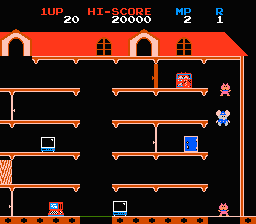
Popeye is a 1982 arcade game developed and released by Nintendo based on the Popeye cartoon characters licensed from King Features Syndicate. Some sources claim that Ikegami Tsushinki also did design work on Popeye.
The Family Computer (Famicom) saw an educational sequel on November 22, 1983: Popeye no Eigo Asobi, an English teaching game akin to the later Donkey Kong Jr. Math.
In Popeye, two players can alternate playing or one player can play alone. The top five highest scores are kept along with the player's three initials. Popeye was available in standard and cocktail configurations.
Ben Falls holds the world record score of 3,023,060 earned on December 20, 2011 according to Twin Galaxies International Scoreboard.
The Popeye characters were originally going to be used in the game that later became Donkey Kong. However at that time on the development of the game, Nintendo could not get the licenses to use the characters.
The object of the game is for Popeye to collect a certain number of items dropped by Olive Oyl, depending on the level — 24 hearts, 16 musical notes, or 24 letters in the word HELP — while avoiding the Sea Hag, Brutus and other dangers. The player can make Popeye walk back and forth and up and down stairs and ladders with a 4-way joystick. There is an attack button, but unlike similar games of the period, no jump button. Conversely, Brutus can jump down a level and also jump up to hit Popeye if he is directly above.
Despite the feature of an attack button, Popeye cannot attack Brutus directly. Instead, the button is used for the following:
Text: Wikipedia via RetroGames.cz, licensed under CC BY-SA 3.0
Keyboard controls
| NES | Player 1 | Player 2 |
|---|---|---|
| D-pad | ↑↓←→ | IKJL |
| B | Z | N |
| A | X | M |
| Select | Shift | B |
| Start | Enter | Space |
Hotkeys
- 1 Quick save state
- 2 Quick load state
- 3 Change save slot
Gamepads are detected when you press a button. Remap any key from the emulator’s Controls menu (gear icon).
Live chat
Connecting…
Keyboard controls
| NES | Player 1 | Player 2 |
|---|---|---|
| D-pad | ↑↓←→ | IKJL |
| B | Z | N |
| A | X | M |
| Select | Shift | B |
| Start | Enter | Space |
Hotkeys
- 1 Quick save state
- 2 Quick load state
- 3 Change save slot
Gamepads are detected when you press a button. Remap any key from the emulator’s Controls menu (gear icon).
Comments