Joust

209K plays 1982 #Action
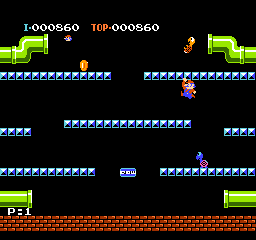
Joust is a 1982 action game developed and published by Williams Electronics for arcades. Players assume the role of knights armed with lances and mounted on large birds (an ostrich for Player 1 and a stork for Player 2). They progress through levels, which consist of a single screen filled with floating platforms, by defeating enemy knights riding buzzards and other opponents.
Using the computer hardware from the company's earlier arcade game, Defender, John Newcomer led the development team: Bill Pfutzenreuter, Janice Woldenberg-Miller (née Hendricks), Python Anghelo, Tim Murphy, and John Kotlarik. Newcomer aimed to create a flying game, with cooperative two-player gameplay, while avoiding the overdone space theme. After deciding to use birds as characters, he forwent the standard eight-direction joystick control scheme and devised collisions as the means of combat.
The game was well-received by players and critics, and the mechanics influenced other games. Praise focused on the unique premise and enjoyable gameplay. While not the first two-player cooperative video game, Joust's success and polished implementation helped popularize the concept. It was followed by a less popular arcade sequel in 1986: Joust 2: Survival of the Fittest. While Joust was ported to numerous home systems and included in several multiplatform retro game anthologies, efforts to adapt it to other media and create updated video game remakes have been fruitless.
From Wikipedia's article Joust (video game)
Keyboard controls
| NES | Player 1 | Player 2 |
|---|---|---|
| D-pad | ↑↓←→ | IKJL |
| B | Z | N |
| A | X | M |
| Select | Shift | B |
| Start | Enter | Space |
Hotkeys
- 1 Quick save state
- 2 Quick load state
- 3 Change save slot
Gamepads are detected when you press a button. Remap any key from the emulator’s Controls menu (gear icon).
Online, both players use the Player 1 keys (or a gamepad) on their own computer. Saving, loading and pausing are off while you play online.
From the manual, page 4
Live chat
Connecting…
Keyboard controls
| NES | Player 1 | Player 2 |
|---|---|---|
| D-pad | ↑↓←→ | IKJL |
| B | Z | N |
| A | X | M |
| Select | Shift | B |
| Start | Enter | Space |
Hotkeys
- 1 Quick save state
- 2 Quick load state
- 3 Change save slot
Gamepads are detected when you press a button. Remap any key from the emulator’s Controls menu (gear icon).
Online, both players use the Player 1 keys (or a gamepad) on their own computer. Saving, loading and pausing are off while you play online.
From the manual, page 4
2.0 Could be better
AllGame 2.5/5 · 1 review
Review scorecard
- Graphics 2.0 out of 5 Overall fallback
- Sound 2.0 out of 5 Overall fallback
- Control 2.0 out of 5 Overall fallback
- Fun Factor 2.0 out of 5 Overall fallback
Overall fallback: AllGame 2.5/5 · 1 review. Overall source The same 50/100 overall rating fills missing categories using the face scale; these are not separate category scores.
What the reviews talk about
Key wordsweirdcreativeoriginalenjoyableaddictivememorable
What the critics said
The staff concluded that Joust was "Atari's finest since Star Raiders" in 1980.
— Antic, 1984
Retro Gamer writer Mike Bevan called the game's physics "beautifully" realized and described Joust as one of the "most remarkable and well-loved titles" of the Williams library.
— Retro Gamer, 2009 (Mike Bevan)
Reviewing the NES port, Allgame's Skyler Miller noted that the "essential gameplay is intact" but complained about the omission of the arcade version's extra features.
— AllGame (Skyler Miller)
Antic magazine writers called the Atari 8-bit version a "unique, addictive arcade game" that was "almost identical" to the original.
— Antic · about another version
From the Reception section of Wikipedia's Joust (video game) article.
Scores
- 50 AllGame Arcade: 5/5 ; Atari 7800: 4/5 ; NES: 2.5/5
- 100 Play Meter1982 Arcade: 4/4 · other versions
- 83 Computer and Video Games1989 Atari 2600: 83% · other versions
- 67 Tilt1983 Arcade: 4/6 · other versions
From the review table in Wikipedia's Joust (video game) article.
Full reviews
Play online
Play with a friend on another computer. Host a room and send them the link, or list it in Open rooms for anyone to join; they play as Player 2 and you both see the same game.
Press Start Game first.
Go live
Let anyone watch you play, live in their browser. They see your game as you play it, and your online game when you host a room.
Press Start Game first.
Comments