Mr. Nutz

0 plays 1994 #Action
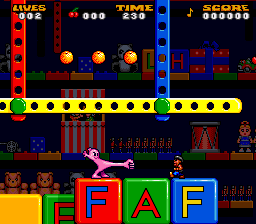
Mr. Nutz is a 2D side-scrolling platform game published by Ocean Software. It was released for the Super Nintendo Entertainment System in late 1993 in Europe and in North America and Japan in 1994. In 1994, it was released for the Mega Drive as Ocean's first Sega game, and on the Game Boy. It was also released on the Sega Channel in 1995, the Game Boy Color in 1999, and remade for the Game Boy Advance in 2001.
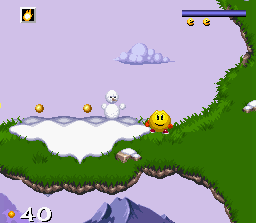
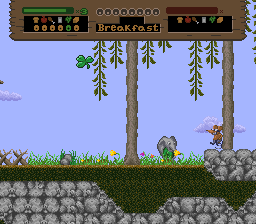
The player controls the one player character, Mr. Nutz, an anthropomorphic red squirrel through six themed levels. The end goal is to stop Mr. Blizzard, a yeti, who is trying to take over the world by using his magic powers to turn it into a mass of ice. Ammunition, in the form of nuts, can be collected and thrown at enemies.
Ocean originally planned to release the game for the Amiga. After the original conversion plan was shelved, Ocean eventually released in 1994 a different game on the Amiga under the name Mr. Nutz: Hoppin' Mad. Developed by Neon Studios, it featured the same titular character but with different, faster and more wide-open gameplay, unrelated levels and enemies, another story, and a large overworld map instead of a linear path to follow in a mini-map. Hoppin' Mad was going to be released for the Sega Mega Drive in 1995 as Mr. Nutz 2, but it got shelved. A playable build exists, leaked in the form of source code and compiled upon.
From Wikipedia's article Mr. Nutz
Keyboard controls
| SNES | Player 1 | Player 2 |
|---|---|---|
| D-pad | ↑↓←→ | IKJL |
| A | Z | M |
| B | X | N |
| X | A | U |
| Y | S | H |
| L | Q | Y |
| R | E | O |
| Select | Shift | B |
| Start | Enter | Space |
Hotkeys
- 1 Quick save state
- 2 Quick load state
- 3 Change save slot
Gamepads are detected when you press a button. Remap any key from the emulator’s Controls menu (gear icon).
Online, both players use the Player 1 keys (or a gamepad) on their own computer. Saving, loading and pausing are off while you play online.
Live chat
Connecting…
Keyboard controls
| SNES | Player 1 | Player 2 |
|---|---|---|
| D-pad | ↑↓←→ | IKJL |
| A | Z | M |
| B | X | N |
| X | A | U |
| Y | S | H |
| L | Q | Y |
| R | E | O |
| Select | Shift | B |
| Start | Enter | Space |
Hotkeys
- 1 Quick save state
- 2 Quick load state
- 3 Change save slot
Gamepads are detected when you press a button. Remap any key from the emulator’s Controls menu (gear icon).
Online, both players use the Player 1 keys (or a gamepad) on their own computer. Saving, loading and pausing are off while you play online.
3.5 Good job
Critics 75 · 12 reviews
Review scorecard
- Graphics 3.5 out of 5 Overall fallback
- Sound 3.5 out of 5 Overall fallback
- Control 3.5 out of 5 Overall fallback
- Fun Factor 3.5 out of 5 Overall fallback
Overall fallback: Critics 75 · 12 reviews. Overall source The same 75/100 overall rating fills missing categories using the face scale; these are not separate category scores.
What the reviews talk about
Key wordstough
What the critics said
They praised the use of parallax scrolling and the "beautifully drawn" backgrounds, but remarked that "the game play, despite the hidden secret levels and fairly tough challenge, just isn't very interesting."
— GamePro, 1993
From the Reception section of Wikipedia's Mr. Nutz article.
Scores
- 93 Superjuegos1995 91/100; 90/100; 93/100
- 86 Super Play 86%
- 84 Computer and Video Games1993 2/5; 84/100
- 84 Total!1993 70%; 84%
- 83 Aktueller Software Markt1994 10/12
- 77 Mega Fun1994 75%; 75%; 77%
- 70 AllGame 3.5/5
- 68 Video Games (DE)1994 68%; 4/5; 69%; 68%
- 66 Nintendo Power1994 3.3/5
- 65 GamePro 3.25/5
- 65 Jeuxvideo.com2000 14/20; 13/20; 13/20
- 63 GameZone1993 63/100
- – Giant Bomb true
- 94 Player One1994 94% · other versions
- 90 Consoles +1994 87%; 92% · other versions
- 75 Hyper1995 75/100 · other versions
- 70 IGN1999 7/10 · other versions
From the review table in Wikipedia's Mr. Nutz article.
Full reviews
Play online
Play with a friend on another computer. Host a room and send them the link, or list it in Open rooms for anyone to join; they play as Player 2 and you both see the same game.
Press Start Game first.
Go live
Let anyone watch you play, live in their browser. They see your game as you play it, and your online game when you host a room.
Press Start Game first.

Comments