Metal Storm
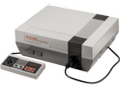
Metal Storm is an action-platform video game developed by Tamtex and published by Irem for the Nintendo Entertainment System (NES). Irem released it in North America in February 1991 and in Japan on April 24, 1992. The game is defined by its central mechanic of the player's ability to reverse gravity at will, upon which all of its levels and challenges are built.
Its release garnered positive reviews and significant promotional support, including a cover feature in Nintendo Power. However, it was a commercial failure, largely attributed to its release at the end of the NES's lifecycle, as the market shifted to highly-anticipated 16-bit consoles like the Super Nintendo Entertainment System launching later that year.
In the years following its release, Metal Storm was critically reappraised through multiple eras of acclaim. It was first championed as an "unsung hero" by publications in the early 1990s and was later rediscovered by Internet-era retro gaming communities. Critics have consistently praised its innovative gameplay and technical feats that push the NES's limits, such as simulation of parallax scrolling. In 2019, its official re-release made the definitive Japanese version of the game widely available for the first time.
From Wikipedia's article Metal Storm (video game)
Keyboard controls
| NES | Player 1 | Player 2 |
|---|---|---|
| D-pad | ↑↓←→ | IKJL |
| B | Z | N |
| A | X | M |
| Select | Shift | B |
| Start | Enter | Space |
Hotkeys
- 1 Quick save state
- 2 Quick load state
- 3 Change save slot
Gamepads are detected when you press a button. Remap any key from the emulator’s Controls menu (gear icon).
Online, both players use the Player 1 keys (or a gamepad) on their own computer. Saving, loading and pausing are off while you play online.
Live chat
Connecting…
Keyboard controls
| NES | Player 1 | Player 2 |
|---|---|---|
| D-pad | ↑↓←→ | IKJL |
| B | Z | N |
| A | X | M |
| Select | Shift | B |
| Start | Enter | Space |
Hotkeys
- 1 Quick save state
- 2 Quick load state
- 3 Change save slot
Gamepads are detected when you press a button. Remap any key from the emulator’s Controls menu (gear icon).
Online, both players use the Player 1 keys (or a gamepad) on their own computer. Saving, loading and pausing are off while you play online.
3.5 Good job
Critics 76 · 8 reviews
Review scorecard
- Graphics 3.5 out of 5 Overall fallback
- Sound 3.5 out of 5 Overall fallback
- Control 3.5 out of 5 Overall fallback
- Fun Factor 3.5 out of 5 Overall fallback
Overall fallback: Critics 76 · 8 reviews. Overall source The same 76/100 overall rating fills missing categories using the face scale; these are not separate category scores.
What the reviews talk about
Key wordsinventiveslickdetailedoriginal
What the critics said
Computer and Video Games called it a "slick, beautifully executed game", and Game Player's praised the "large, detailed sprites and multi-scrolling backgrounds", calling it a "must-buy" for action fans.
— Computer and Video Games, 1991
Nintendo Power included it in a 1993 feature on the "Unsung Heroes of the NES", complimenting its "inventive play control, great bosses and a level of challenge that was a cut above the average NES fare" but blaming low distribution and referencing itself as the "best marketing support the game ever received".
— Nintendo Power, 1993
From the Reception section of Wikipedia's Metal Storm (video game) article.
Scores
- 88 Computer and Video Games1991 88/100
- 88 Mean Machines1991 88%
- 81 ACE1991 810/1000
- 80 Game Players 8/10
- 78 Electronic Gaming Monthly1991 7.75/10
- 74 Nintendo Power1991 3.7/5
- 63 PlayStation Magazine (JP)1998 18.9/30
- 60 Famitsu1992 24/40
From the review table in Wikipedia's Metal Storm (video game) article.
Full reviews
Play online
Play with a friend on another computer. Host a room and send them the link, or list it in Open rooms for anyone to join; they play as Player 2 and you both see the same game.
Press Start Game first.
Go live
Let anyone watch you play, live in their browser. They see your game as you play it, and your online game when you host a room.
Press Start Game first.
Comments