Lost Vikings II: Norse by Norsewest

101K plays 1997 #Action#Platform#Puzzle
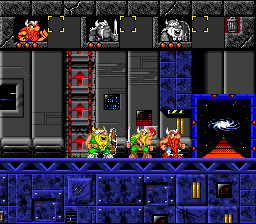
Lost Vikings 2 is a 1997 puzzle-platform game developed by Blizzard Entertainment and Beam Software, and published by Interplay. All versions of the game, except the SNES release, were titled Lost Vikings 2: Norse by Norsewest (Norse by Norse West: The Return of The Lost Vikings in the U.S.). The sequel to The Lost Vikings, it features the original three Viking characters plus two new playable characters: Fang the werewolf and Scorch the dragon. The gameplay remains largely the same, though the three Viking characters all have new or modified abilities.
The releases for MS-DOS, Microsoft Windows, PlayStation, and Saturn feature pre-rendered 3D graphics, CD music and extensive voice acting provided by Rob Paulsen (Erik), Jeff Bennett (Baleog and Fang), Jim Cummings (Olaf, Tomator), Frank Welker (Scorch), Tress MacNeille, and Kath Soucie.
The SNES version by Blizzard Entertainment, which was developed in 1995 but kept shelved until 1997 so it could be released together with the next generation versions by Beam Software, is the original version of the game and continued the use of the more cartoony graphics style seen in the first game. It is also the last Blizzard development on the SNES console.
From Wikipedia's article The Lost Vikings 2, licensed under CC BY-SA 4.0
Keyboard controls
| SNES | Player 1 | Player 2 |
|---|---|---|
| D-pad | ↑↓←→ | IKJL |
| A | Z | M |
| B | X | N |
| X | A | U |
| Y | S | H |
| L | Q | Y |
| R | E | O |
| Select | Shift | B |
| Start | Enter | Space |
Hotkeys
- 1 Quick save state
- 2 Quick load state
- 3 Change save slot
Gamepads are detected when you press a button. Remap any key from the emulator’s Controls menu (gear icon).
Online, both players use the Player 1 keys (or a gamepad) on their own computer. Saving, loading and pausing are off while you play online.
From the manual, page 4
Live chat
Connecting…
Keyboard controls
| SNES | Player 1 | Player 2 |
|---|---|---|
| D-pad | ↑↓←→ | IKJL |
| A | Z | M |
| B | X | N |
| X | A | U |
| Y | S | H |
| L | Q | Y |
| R | E | O |
| Select | Shift | B |
| Start | Enter | Space |
Hotkeys
- 1 Quick save state
- 2 Quick load state
- 3 Change save slot
Gamepads are detected when you press a button. Remap any key from the emulator’s Controls menu (gear icon).
Online, both players use the Player 1 keys (or a gamepad) on their own computer. Saving, loading and pausing are off while you play online.
From the manual, page 4
Play online
Play with a friend on another computer. Host a room and send them the link; they join as Player 2 and you both see the same game.
Press Start Game first.
Go live
Let anyone watch you play, live in their browser. They see your game as you play it, and your online game when you host a room.
Press Start Game first.
Comments