Knightmare II: The Maze of Galious

28K plays 1987 #Action#Platform
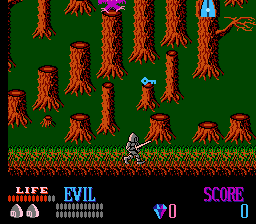
The Maze of Galious is a 1987 action-adventure game developed and published by Konami for the MSX home computer. A reworked conversion was released for the Family Computer. Both versions were re-released digitally for Microsoft Windows. The second entry in the Knightmare trilogy, it follows the respective hero and former damsel in distress of the previous game, Popolon and Aphrodite, as they embark on a journey through Castle Greek to free their unborn child Pampas from the evil priest Galious. The player explores each map in search for items and power-ups to progress, while also fighting enemies and bosses.
The Maze of Galious was created by the MSX division at Konami under management of Shigeru Fukutake. The process of making original titles for the platform revolved around the person who came up with the characters. A team of seven members were responsible for its development, lasting somewhere between four and six months, with Ryouhei Shogaki being the project's lead designer. The game garnered a generally favorable reception from critics and retrospective commentators. It served as influence for La-Mulana (2006), while the game's exploration bits were utilized for Castlevania II: Simon's Quest. It was followed by Shalom: Knightmare III (1987). In the years since, fans have experimented with remaking and porting the title unofficially to other platforms.
From Wikipedia's article The Maze of Galious
Keyboard controls
| NES | Player 1 | Player 2 |
|---|---|---|
| D-pad | ↑↓←→ | IKJL |
| B | Z | N |
| A | X | M |
| Select | Shift | B |
| Start | Enter | Space |
Hotkeys
- 1 Quick save state
- 2 Quick load state
- 3 Change save slot
Gamepads are detected when you press a button. Remap any key from the emulator’s Controls menu (gear icon).
Online, both players use the Player 1 keys (or a gamepad) on their own computer. Saving, loading and pausing are off while you play online.
Live chat
Connecting…
Keyboard controls
| NES | Player 1 | Player 2 |
|---|---|---|
| D-pad | ↑↓←→ | IKJL |
| B | Z | N |
| A | X | M |
| Select | Shift | B |
| Start | Enter | Space |
Hotkeys
- 1 Quick save state
- 2 Quick load state
- 3 Change save slot
Gamepads are detected when you press a button. Remap any key from the emulator’s Controls menu (gear icon).
Online, both players use the Player 1 keys (or a gamepad) on their own computer. Saving, loading and pausing are off while you play online.
2.5 Could be better
Critics 67 · 2 reviews
Review scorecard
- Graphics 2.5 out of 5 Overall fallback
- Sound 2.5 out of 5 Overall fallback
- Control 2.5 out of 5 Overall fallback
- Fun Factor 2.5 out of 5 Overall fallback
Overall fallback: Critics 67 · 2 reviews. Overall source The same 67/100 overall rating fills missing categories using the face scale; these are not separate category scores.
What the reviews talk about
Key wordsoriginaldullvariedcolourfuldifficultfun
Scores
- 68 Famitsu1987 27/40 (FC)
- 66 Family Computer Magazine 19.79/30 (FC)
- 100 MSX Gids 5/5 (MSX) · other versions
- 100 MSX Magazine (JP) 5/5 (MSX) · other versions
- 98 Input MSX 49/50 (MSX) · other versions
- 85 Micros MSX 17/20 (MSX) · other versions
- 40 Tilt 8/20 (MSX) · other versions
From the review table in Wikipedia's The Maze of Galious article.
Full reviews
Play online
Play with a friend on another computer. Host a room and send them the link, or list it in Open rooms for anyone to join; they play as Player 2 and you both see the same game.
Press Start Game first.
Go live
Let anyone watch you play, live in their browser. They see your game as you play it, and your online game when you host a room.
Press Start Game first.
Comments