Kirby's Dream Course

0 plays 1995 #Sport
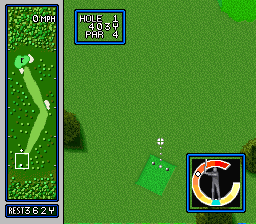
Kirby's Dream Course is a 1994 miniature golf video game developed by HAL Laboratory and Nintendo EAD and published by Nintendo for the Super Nintendo Entertainment System (SNES). A spin-off of the Kirby series and the first released for the SNES, players control the pink spherical character Kirby through a series of courses by launching him towards the goal hole at the end. Kirby can hit enemies to collect power-ups that grant him unique abilities, such as those that allow him to destroy certain obstacles or fly around the level.
HAL Laboratory originally designed Dream Course as a standalone game called Special Tee Shot. Though it was previewed in several magazines and displayed on the packaging for the console, HAL replaced the game's original characters with those from the Kirby series following its popularity on the Game Boy. Special Tee Shot was later released for the Satellaview peripheral in Japan. Dream Course received favorable reviews, both at release and retrospectively, for its unique design and absurdity. Some were critical of its high difficulty level and controls. It has been re-released through the Wii and Wii U Virtual Console digital storefronts and the Super NES Classic Edition. A sequel for the Nintendo 64 was in development but later canceled.
From Wikipedia's article Kirby's Dream Course
Keyboard controls
| SNES | Player 1 | Player 2 |
|---|---|---|
| D-pad | ↑↓←→ | IKJL |
| A | Z | M |
| B | X | N |
| X | A | U |
| Y | S | H |
| L | Q | Y |
| R | E | O |
| Select | Shift | B |
| Start | Enter | Space |
Hotkeys
- 1 Quick save state
- 2 Quick load state
- 3 Change save slot
Gamepads are detected when you press a button. Remap any key from the emulator’s Controls menu (gear icon).
Online, both players use the Player 1 keys (or a gamepad) on their own computer. Saving, loading and pausing are off while you play online.
Live chat
Connecting…
Keyboard controls
| SNES | Player 1 | Player 2 |
|---|---|---|
| D-pad | ↑↓←→ | IKJL |
| A | Z | M |
| B | X | N |
| X | A | U |
| Y | S | H |
| L | Q | Y |
| R | E | O |
| Select | Shift | B |
| Start | Enter | Space |
Hotkeys
- 1 Quick save state
- 2 Quick load state
- 3 Change save slot
Gamepads are detected when you press a button. Remap any key from the emulator’s Controls menu (gear icon).
Online, both players use the Player 1 keys (or a gamepad) on their own computer. Saving, loading and pausing are off while you play online.
3.5 Good job
GameRankings 77%
Review scorecard
- Graphics 3.5 out of 5 Overall fallback
- Sound 3.5 out of 5 Overall fallback
- Control 3.5 out of 5 Overall fallback
- Fun Factor 3.5 out of 5 Overall fallback
Overall fallback: GameRankings 77%. Overall source The same 77/100 overall rating fills missing categories using the face scale; these are not separate category scores.
What the reviews talk about
Key wordszanyfuncuteexcitingcolourful
Scores
- 90 GamePro 4.5/5
- 90 Super Game Power1995 4.5/5
- 89 Hyper1995 89%
- 89 Total! 89/100
- 88 Nintendo Acción 88/100
- 80 Computer and Video Games 4/5
- 80 Nintendo Life2007 8/10
- 80 Next Generation 4/5
- 80 Video Games (DE)1995 80%
- 80 VideoGames & Computer Entertainment1995 8/10
- 75 IGN2007 7.5/10
- 70 Famitsu 28/40
- 70 GameSpot2007 7/10
- 69 Nintendo Power1995 3.45/5
- 61 Mega Fun1996 61%
From the review table in Wikipedia's Kirby's Dream Course article.
Full reviews
Play online
Play with a friend on another computer. Host a room and send them the link, or list it in Open rooms for anyone to join; they play as Player 2 and you both see the same game.
Press Start Game first.
Go live
Let anyone watch you play, live in their browser. They see your game as you play it, and your online game when you host a room.
Press Start Game first.
Comments