Head-On Soccer

0 plays 1995 #Sport
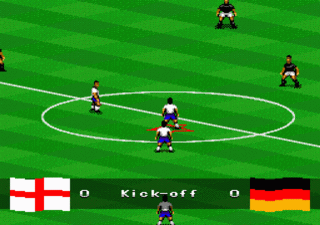
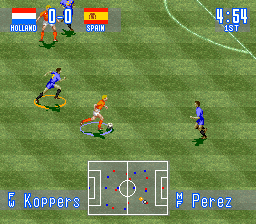
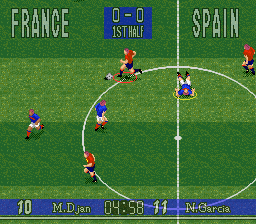
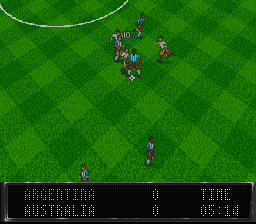
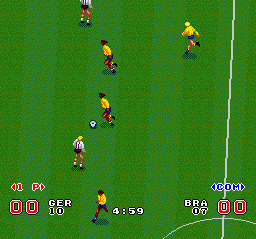
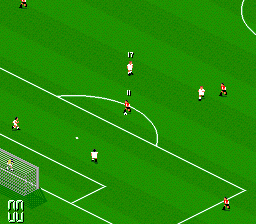
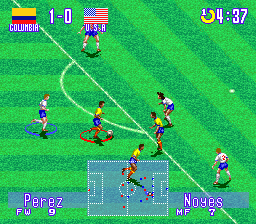
Fever Pitch Soccer, known as Head-On Soccer in North America, is a soccer video game originally developed and published by U.S. Gold for the Sega Genesis/Mega Drive in 1995.
Featuring an arcade-style approach to soccer compared to other titles that were released at the time, Fever Pitch Soccer allows players to have the choice of playing across any of the game modes available against with either CPU-controlled opponents or other players with the team of their choosing. Initially launched for the Genesis, it was then released on the Super Nintendo Entertainment System a few months after the original version and was later ported to the Atari Jaguar in December of the same year.
Fever Pitch Soccer received generally positive reception from critics since its release on the Genesis/Mega Drive, with praise towards the graphics, sound, gameplay and the ability to upgrade the various abilities of the team players upon winning matches. The Super NES version also received positive reception, with praise to the improved graphics and sound from the Genesis original while the Jaguar version, though criticized for not taking advantage of the hardware, was generally well-received and considered by some reviewers as one of the better titles for the system. Critics, however, compared the game with both the FIFA series from Electronic Arts and the original International Superstar Soccer from Konami.
From Wikipedia's article Fever Pitch Soccer
Keyboard controls
| SNES | Player 1 | Player 2 |
|---|---|---|
| D-pad | ↑↓←→ | IKJL |
| A | Z | M |
| B | X | N |
| X | A | U |
| Y | S | H |
| L | Q | Y |
| R | E | O |
| Select | Shift | B |
| Start | Enter | Space |
Hotkeys
- 1 Quick save state
- 2 Quick load state
- 3 Change save slot
Gamepads are detected when you press a button. Remap any key from the emulator’s Controls menu (gear icon).
Online, both players use the Player 1 keys (or a gamepad) on their own computer. Saving, loading and pausing are off while you play online.
Live chat
Connecting…
Keyboard controls
| SNES | Player 1 | Player 2 |
|---|---|---|
| D-pad | ↑↓←→ | IKJL |
| A | Z | M |
| B | X | N |
| X | A | U |
| Y | S | H |
| L | Q | Y |
| R | E | O |
| Select | Shift | B |
| Start | Enter | Space |
Hotkeys
- 1 Quick save state
- 2 Quick load state
- 3 Change save slot
Gamepads are detected when you press a button. Remap any key from the emulator’s Controls menu (gear icon).
Online, both players use the Player 1 keys (or a gamepad) on their own computer. Saving, loading and pausing are off while you play online.
3.5 Good job
Critics 79 · 10 reviews
Review scorecard
- Graphics 3.5 out of 5 Overall fallback
- Sound 3.5 out of 5 Overall fallback
- Control 3.5 out of 5 Overall fallback
- Fun Factor 3.5 out of 5 Overall fallback
Overall fallback: Critics 79 · 10 reviews. Overall source The same 79/100 overall rating fills missing categories using the face scale; these are not separate category scores.
What the reviews talk about
Key wordsfuneasyfast-paced
What the critics said
Next Generation reviewed the Genesis/Mega Drive version of the game, and stated that "Ultimately, Head On Soccer is easy to play and, unfortunately, it's just as easy to stop playing."
— Next Generation, 1995 · about another version
From the Reception section of Wikipedia's Fever Pitch Soccer article.
Scores
- 88 Computer and Video Games 89 / 100; 88 / 100; 74 / 100
- 88 Joypad 88%
- 87 Mega Fun 82%; 87%
- 85 Superjuegos 85 / 100
- 80 Game Players 80%; 80%
- 77 Video Games (DE) 76%; 77%; 72%
- 75 Consoles + 75%
- 75 Player One 75%; 75%
- 71 Micromanía 71%
- 60 Next Generation 3/5; 3/5; 3/5
- – Total! 2
- 90 Mean Machines Sega 90 / 100 · other versions
- 72 GamesMaster 72 / 100 · other versions
From the review table in Wikipedia's Fever Pitch Soccer article.
Full reviews
Play online
Play with a friend on another computer. Host a room and send them the link, or list it in Open rooms for anyone to join; they play as Player 2 and you both see the same game.
Press Start Game first.
Go live
Let anyone watch you play, live in their browser. They see your game as you play it, and your online game when you host a room.
Press Start Game first.
Comments