Ken Griffey Jr. Presents Major League Baseball

0 plays 1994 #Sport
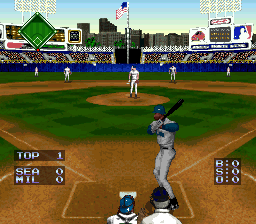
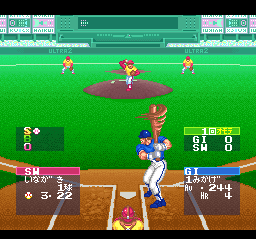
Ken Griffey Jr. Presents Major League Baseball is a 1994 baseball video game developed by Software Creations and published by Nintendo for the Super Nintendo Entertainment System. A Game Boy version was released in 1997. The game has a Major League Baseball (MLB) license but not a Major League Baseball Players Association (MLBPA) license, meaning that the game has real stadiums and real teams, but not real players (except Ken Griffey Jr.). The fictitious players have the same statistics as their real-world counterparts, and the game comes with a name-changing feature that allows players to change the athletes' names. Nintendo released a portable version of the game in 1997 for the Game Boy with real players and stats from the 1996 season. The gameplay is similar to its predecessors, though it is sometimes sluggish due to hardware restrictions. The SNES version came with a promotional Griffey collector's card packed inside. It is often rated by the public as one of the best baseball games of all time.
From Wikipedia's article Ken Griffey Jr. Presents Major League Baseball
Keyboard controls
| SNES | Player 1 | Player 2 |
|---|---|---|
| D-pad | ↑↓←→ | IKJL |
| A | Z | M |
| B | X | N |
| X | A | U |
| Y | S | H |
| L | Q | Y |
| R | E | O |
| Select | Shift | B |
| Start | Enter | Space |
Hotkeys
- 1 Quick save state
- 2 Quick load state
- 3 Change save slot
Gamepads are detected when you press a button. Remap any key from the emulator’s Controls menu (gear icon).
Online, both players use the Player 1 keys (or a gamepad) on their own computer. Saving, loading and pausing are off while you play online.
Live chat
Connecting…
Keyboard controls
| SNES | Player 1 | Player 2 |
|---|---|---|
| D-pad | ↑↓←→ | IKJL |
| A | Z | M |
| B | X | N |
| X | A | U |
| Y | S | H |
| L | Q | Y |
| R | E | O |
| Select | Shift | B |
| Start | Enter | Space |
Hotkeys
- 1 Quick save state
- 2 Quick load state
- 3 Change save slot
Gamepads are detected when you press a button. Remap any key from the emulator’s Controls menu (gear icon).
Online, both players use the Player 1 keys (or a gamepad) on their own computer. Saving, loading and pausing are off while you play online.
3.5 Good job
GameRankings 75%
Review scorecard
- Graphics 3.5 out of 5 Overall fallback
- Sound 3.5 out of 5 Overall fallback
- Control 3.5 out of 5 Overall fallback
- Fun Factor 3.5 out of 5 Overall fallback
Overall fallback: GameRankings 75%. Overall source The same 75/100 overall rating fills missing categories using the face scale; these are not separate category scores.
What the reviews talk about
Key wordsaccessibledifficult
Scores
- 84 GameFan1994 84%
- 84 Video Games (DE) 84%
- 76 Nintendo Power1994 3.775/5
- 66 Electronic Gaming Monthly 6.6/10
From the review table in Wikipedia's Ken Griffey Jr. Presents Major League Baseball article.
Full reviews
Play online
Play with a friend on another computer. Host a room and send them the link, or list it in Open rooms for anyone to join; they play as Player 2 and you both see the same game.
Press Start Game first.
Go live
Let anyone watch you play, live in their browser. They see your game as you play it, and your online game when you host a room.
Press Start Game first.
Comments