Dragon Ball Z: Super Butouden 3

0 plays 1994 #Fighting
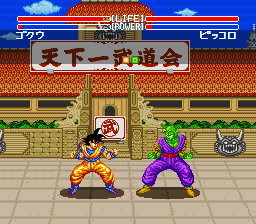
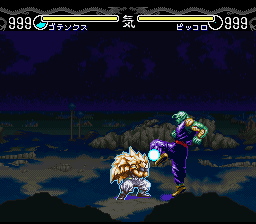
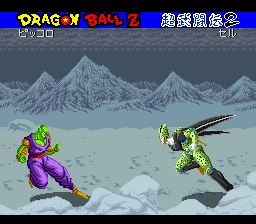
Dragon Ball Z: Super Butōden 3 is a 1994 fighting video game developed by Tose and published by Bandai for the Super Nintendo Entertainment System. Based upon Akira Toriyama's Dragon Ball franchise, it is the sequel to Dragon Ball Z: Super Butōden 2, which was released earlier in 1993 for SNES. Following the Majin Buu arc, its gameplay remains relatively the same as the previous two Super Butōden entries, consisting of one-on-one fights using a main six-button configuration, featuring special moves as well as two playable modes.
Dragon Ball Z: Super Butōden 3 was created by most of the same team who previously worked on the first two Super Butōden entries on Super Nintendo, with producer Toshihiro Suzuki returning to lead its production, with additional support from staff of both Toei Animation and V Jump magazine. Like its predecessors, Super Butōden 3 garnered positive reception from critics, however the lack of a story mode was heavily criticized by reviewers. Likely due to the game releasing in the middle of the Majin Buu Saga, rendering a faithful adaptation impossible.
This is the Japanese release, so its text is in Japanese.
From Wikipedia's article Dragon Ball Z: Super Butōden 3
Keyboard controls
| SNES | Player 1 | Player 2 |
|---|---|---|
| D-pad | ↑↓←→ | IKJL |
| A | Z | M |
| B | X | N |
| X | A | U |
| Y | S | H |
| L | Q | Y |
| R | E | O |
| Select | Shift | B |
| Start | Enter | Space |
Hotkeys
- 1 Quick save state
- 2 Quick load state
- 3 Change save slot
Gamepads are detected when you press a button. Remap any key from the emulator’s Controls menu (gear icon).
Online, both players use the Player 1 keys (or a gamepad) on their own computer. Saving, loading and pausing are off while you play online.
Live chat
Connecting…
Keyboard controls
| SNES | Player 1 | Player 2 |
|---|---|---|
| D-pad | ↑↓←→ | IKJL |
| A | Z | M |
| B | X | N |
| X | A | U |
| Y | S | H |
| L | Q | Y |
| R | E | O |
| Select | Shift | B |
| Start | Enter | Space |
Hotkeys
- 1 Quick save state
- 2 Quick load state
- 3 Change save slot
Gamepads are detected when you press a button. Remap any key from the emulator’s Controls menu (gear icon).
Online, both players use the Player 1 keys (or a gamepad) on their own computer. Saving, loading and pausing are off while you play online.
3.5 Good job
Critics 77 · 10 reviews
Review scorecard
- Graphics 3.5 out of 5 Overall fallback
- Sound 3.5 out of 5 Overall fallback
- Control 3.5 out of 5 Overall fallback
- Fun Factor 3.5 out of 5 Overall fallback
Overall fallback: Critics 77 · 10 reviews. Overall source The same 77/100 overall rating fills missing categories using the face scale; these are not separate category scores.
What the reviews talk about
Key wordsexcellent
Scores
- 91 Joypad 91%
- 87 HobbyConsolas 87/100
- 87 Player One 87%
- 85 Consoles + 85%
- 84 Super Power (magazine) 84/100
- 78 Nintendo Acción 78/100
- 70 Super Play 70%
- 67 Nintendo Player 4/6
- 60 Famitsu 7/10, 5/10, 7/10, 5/10
- 60 Jeuxvideo.com2010 12/20
From the review table in Wikipedia's Dragon Ball Z: Super Butōden 3 article.
Full reviews
Play online
Play with a friend on another computer. Host a room and send them the link, or list it in Open rooms for anyone to join; they play as Player 2 and you both see the same game.
Press Start Game first.
Go live
Let anyone watch you play, live in their browser. They see your game as you play it, and your online game when you host a room.
Press Start Game first.
Comments