Dragon Ball Z: Super Butouden 2

0 plays 1993 #Fighting
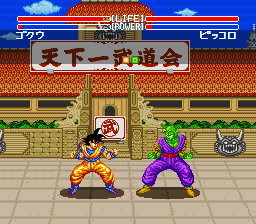
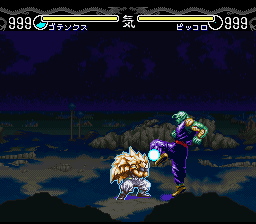
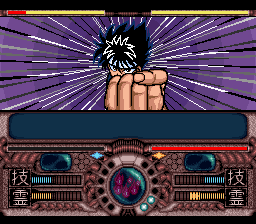
Dragon Ball Z: Super Butōden 2 is a 1993 fighting video game developed by Tose and published by Bandai for the Super Nintendo Entertainment System. Based upon Akira Toriyama's Dragon Ball franchise, it is the sequel to Dragon Ball Z: Super Butōden, which was released earlier in 1993 for SNES. Following the Cell Games arc and a side-story about characters from the films Dragon Ball Z: Broly – The Legendary Super Saiyan and Dragon Ball Z: Bojack Unbound, its gameplay remains relatively the same as the original Super Butōden, consisting of one-on-one fights using a main six-button configuration, featuring special moves as well as three playable modes.
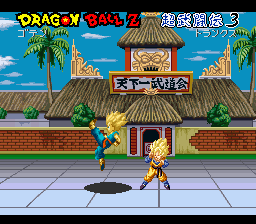
Dragon Ball Z: Super Butōden 2 was developed by most of the same team who previously worked on the first Super Butōden entry shortly after its completion. The team wanted to increase the number of playable stages, implement adventure elements to the tournament mode, as well as feature characters from the Dragon Ball Z films in the project. Super Butōden 2 garnered positive reception from critics; most reviewers praised the presentation, visuals, audio, gameplay and improvements made over its predecessor but others regarded it to be similar to Super Butōden and felt mixed in regards to various design aspects. It was followed by Dragon Ball Z: Super Butōden 3 in 1994.
This is the Japanese release, so its text is in Japanese.
From Wikipedia's article Dragon Ball Z: Super Butōden 2
Keyboard controls
| SNES | Player 1 | Player 2 |
|---|---|---|
| D-pad | ↑↓←→ | IKJL |
| A | Z | M |
| B | X | N |
| X | A | U |
| Y | S | H |
| L | Q | Y |
| R | E | O |
| Select | Shift | B |
| Start | Enter | Space |
Hotkeys
- 1 Quick save state
- 2 Quick load state
- 3 Change save slot
Gamepads are detected when you press a button. Remap any key from the emulator’s Controls menu (gear icon).
Online, both players use the Player 1 keys (or a gamepad) on their own computer. Saving, loading and pausing are off while you play online.
Live chat
Connecting…
Keyboard controls
| SNES | Player 1 | Player 2 |
|---|---|---|
| D-pad | ↑↓←→ | IKJL |
| A | Z | M |
| B | X | N |
| X | A | U |
| Y | S | H |
| L | Q | Y |
| R | E | O |
| Select | Shift | B |
| Start | Enter | Space |
Hotkeys
- 1 Quick save state
- 2 Quick load state
- 3 Change save slot
Gamepads are detected when you press a button. Remap any key from the emulator’s Controls menu (gear icon).
Online, both players use the Player 1 keys (or a gamepad) on their own computer. Saving, loading and pausing are off while you play online.
4.0 Great job!
Critics 80 · 10 reviews
Review scorecard
- Graphics 4.0 out of 5 Overall fallback
- Sound 4.0 out of 5 Overall fallback
- Control 4.0 out of 5 Overall fallback
- Fun Factor 4.0 out of 5 Overall fallback
Overall fallback: Critics 80 · 10 reviews. Overall source The same 80/100 overall rating fills missing categories using the face scale; these are not separate category scores.
What the reviews talk about
Key wordsfuncolourfulrepetitiveoriginal
Scores
- 93 Joypad 93%
- 93 Superjuegos 93/100
- 92 Player One 92%
- 92 Nintendo Acción 92/100
- 83 Nintendo Player 5/6
- 80 Jeuxvideo.com2010 16/20
- 73 Super Play 73%
- 70 Nintendo Life2016 7/10
- 68 Famitsu1993 27/40
- 59 Mega Fun 59%
From the review table in Wikipedia's Dragon Ball Z: Super Butōden 2 article.
Full reviews
Play online
Play with a friend on another computer. Host a room and send them the link, or list it in Open rooms for anyone to join; they play as Player 2 and you both see the same game.
Press Start Game first.
Go live
Let anyone watch you play, live in their browser. They see your game as you play it, and your online game when you host a room.
Press Start Game first.
Comments