Dr. Mario

0 plays 1998 #Puzzle
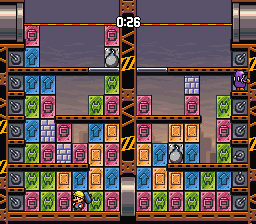
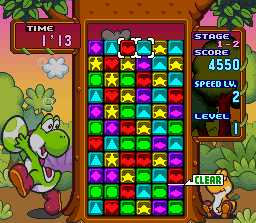
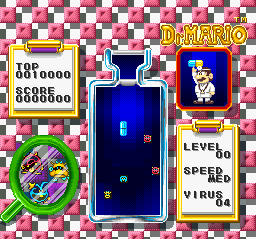
Dr. Mario (stylized as D℞ MARIO) is a 1990 puzzle video game developed and published by Nintendo for the Nintendo Entertainment System and Game Boy. A spin-off of the Mario series, it is a falling block puzzle game in which the player's objective is to destroy the viruses populating the on-screen playing field by using colored capsules that are automatically tossed into the field by Dr. Mario. The player manipulates the falling capsules, to align the same colors, which destroys viruses. The player progresses through the game by eliminating all the viruses on the screen in each level. The game was produced by Gunpei Yokoi and programmed by Takahiro Harada, with the soundtrack composed by Hirokazu Tanaka.
Dr. Mario was a commercial success, with more than 10 million copies sold worldwide across all platforms. It received generally positive reviews, appearing on several lists of "Best Nintendo Games of All Time". It has been ported, remade, or had a sequel on every Nintendo home console since the NES, and on most portable consoles, including a re-release in 2004 on the Game Boy Advance in the Classic NES Series. It was modified into minigames in WarioWare, Inc.: Mega Microgames!, Brain Age 2: More Training in Minutes a Day!, and Brain Age: Concentration Training. Dr. Luigi is a spin-off for Wii U, released on December 31, 2013, as part of the Year of Luigi celebration.
From Wikipedia's article Dr. Mario
Keyboard controls
| SNES | Player 1 | Player 2 |
|---|---|---|
| D-pad | ↑↓←→ | IKJL |
| A | Z | M |
| B | X | N |
| X | A | U |
| Y | S | H |
| L | Q | Y |
| R | E | O |
| Select | Shift | B |
| Start | Enter | Space |
Hotkeys
- 1 Quick save state
- 2 Quick load state
- 3 Change save slot
Gamepads are detected when you press a button. Remap any key from the emulator’s Controls menu (gear icon).
Online, both players use the Player 1 keys (or a gamepad) on their own computer. Saving, loading and pausing are off while you play online.
Live chat
Connecting…
Keyboard controls
| SNES | Player 1 | Player 2 |
|---|---|---|
| D-pad | ↑↓←→ | IKJL |
| A | Z | M |
| B | X | N |
| X | A | U |
| Y | S | H |
| L | Q | Y |
| R | E | O |
| Select | Shift | B |
| Start | Enter | Space |
Hotkeys
- 1 Quick save state
- 2 Quick load state
- 3 Change save slot
Gamepads are detected when you press a button. Remap any key from the emulator’s Controls menu (gear icon).
Online, both players use the Player 1 keys (or a gamepad) on their own computer. Saving, loading and pausing are off while you play online.
3.0 Good job
Nintendo Power 7.2/10 · 1 review
Review scorecard
- Graphics 3.0 out of 5 Overall fallback
- Sound 3.0 out of 5 Overall fallback
- Control 3.0 out of 5 Overall fallback
- Fun Factor 3.0 out of 5 Overall fallback
Overall fallback: Nintendo Power 7.2/10 · 1 review. Overall source The same 72/100 overall rating fills missing categories using the face scale; these are not separate category scores.
What the reviews talk about
Key wordsplayableaddictivememorablesmoothcomplexfun
What the critics said
In 2019, PC Magazine included Dr. Mario on their "The 10 Best Game Boy Games".
— PC Magazine, 2019 · about another version
From the Reception section of Wikipedia's Dr. Mario article.
Scores
- 72 Nintendo Power 7.2/10
- 93 Joystick1990 GB: 93% · other versions
- 89 Zero1990 GB: 89% · other versions
- 80 AllGame NES: 4/5 · other versions
- 78 Famitsu NES: 8/10, 8/10, 9/10, 6/10 ; ; GB: 7/10, 8/10, 9/10, 7/10 · other versions
- 77 Nintendojo GBA: 7.7/10 · other versions
- 74 GameSpot2004 GBA: 7.4/10 · other versions
- 70 IGN2004 GBA: 7/10 · other versions
- 67 Play2004 GBA: 67% · other versions
- 58 Electronic Gaming Monthly1990 GB: 4/10, 6/10, 6/10, 7/10 · other versions
- 51 ACE1990 GB: 510/1000 · other versions
From the review table in Wikipedia's Dr. Mario article.
Full reviews
Play online
Play with a friend on another computer. Host a room and send them the link, or list it in Open rooms for anyone to join; they play as Player 2 and you both see the same game.
Press Start Game first.
Go live
Let anyone watch you play, live in their browser. They see your game as you play it, and your online game when you host a room.
Press Start Game first.
Comments