Donkey Kong Jr.

265K plays 1982 #Action#Platform
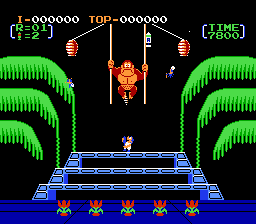
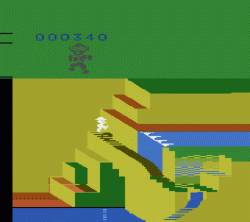
Donkey Kong Jr. is a 1982 platform game developed and published by Nintendo for arcades. It is the sequel to 1981's Donkey Kong, but with the roles reversed compared to its predecessor: Mario is now the villain and Donkey Kong Jr. is trying to save his kidnapped father. After its initial release in arcades, the game was ported to a variety of home consoles, including the Famicom/Nintendo Entertainment System (for which the game was released as a launch title in Japan). The game's title is written as Donkey Kong Junior in the North American arcade version and various conversions to non-Nintendo systems.
The game was principally designed by Shigeru Miyamoto and his co-worker, Nintendo chief engineer Gunpei Yokoi. Miyamoto also created the graphics for the game along with Yoshio Sakamoto. As with its predecessor, the music for the game was composed by Yukio Kaneoka.
A sequel, Donkey Kong 3, and a spin-off game, Donkey Kong Jr. Math, were released in 1983.
From Wikipedia's article Donkey Kong Jr., licensed under CC BY-SA 4.0
Keyboard controls
| Atari 2600 | Player 1 | Player 2 |
|---|---|---|
| D-pad | ↑↓←→ | IKJL |
| Fire | Z | N |
| Game Select | Shift | |
| Game Reset | Enter |
Hotkeys
- 1 Quick save state
- 2 Quick load state
- 3 Change save slot
Most games start with Game Reset. Paddle games (Breakout, Kaboom!…) need a gamepad stick.
Gamepads are detected when you press a button. Remap any key from the emulator’s Controls menu (gear icon).
From the manual, pages 3–4
Live chat
Connecting…
Keyboard controls
| Atari 2600 | Player 1 | Player 2 |
|---|---|---|
| D-pad | ↑↓←→ | IKJL |
| Fire | Z | N |
| Game Select | Shift | |
| Game Reset | Enter |
Hotkeys
- 1 Quick save state
- 2 Quick load state
- 3 Change save slot
Most games start with Game Reset. Paddle games (Breakout, Kaboom!…) need a gamepad stick.
Gamepads are detected when you press a button. Remap any key from the emulator’s Controls menu (gear icon).
From the manual, pages 3–4
Go live
Let anyone watch you play, live in their browser. They see your game as you play it.
Press Start Game first.




Comments