Time Trax

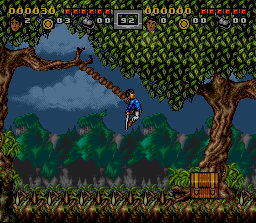
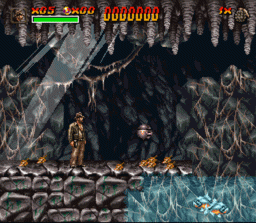
Time Trax is a 1994 action-platform video game developed by Malibu Interactive and published by Malibu Games for the Super Nintendo Entertainment System. It is based on the television series of the same name, which aired from 1993 to 1994. The story follows police Captain Lambert as he tries to stop criminal fugitives from changing history and gaining control of the future, with aid from his supercomputer assistant. The player controls Lambert across eight levels, apprehending enemies using a stunner weapon capable of sending them back to the future. The player can also use martial arts to defeat enemies, or use a time ability to slow them down.
Time Trax was produced by Malibu Interactive, an American-British studio established by Cinemaware co-founder Bob Jacob with former staff from Ocean Software and Software Creations. It was co-produced by George Sinfield, Ian McGee, and Steve Ryno. The soundtrack was scored by Richard Joseph. A Sega Genesis version, featuring music composed by Tim Follin, was developed but never released until a prototype was leaked online. The game garnered a generally favorable critical reception; praise was given to the audiovisual presentation but most reviewers felt divided regarding its gameplay, while criticism was geared towards aspects such as the difficulty and lack of continues.
From Wikipedia's article Time Trax (video game)
Keyboard controls
| SNES | Player 1 | Player 2 |
|---|---|---|
| D-pad | ↑↓←→ | IKJL |
| A | Z | M |
| B | X | N |
| X | A | U |
| Y | S | H |
| L | Q | Y |
| R | E | O |
| Select | Shift | B |
| Start | Enter | Space |
Hotkeys
- 1 Quick save state
- 2 Quick load state
- 3 Change save slot
Gamepads are detected when you press a button. Remap any key from the emulator’s Controls menu (gear icon).
Online, both players use the Player 1 keys (or a gamepad) on their own computer. Saving, loading and pausing are off while you play online.
Live chat
Connecting…
Keyboard controls
| SNES | Player 1 | Player 2 |
|---|---|---|
| D-pad | ↑↓←→ | IKJL |
| A | Z | M |
| B | X | N |
| X | A | U |
| Y | S | H |
| L | Q | Y |
| R | E | O |
| Select | Shift | B |
| Start | Enter | Space |
Hotkeys
- 1 Quick save state
- 2 Quick load state
- 3 Change save slot
Gamepads are detected when you press a button. Remap any key from the emulator’s Controls menu (gear icon).
Online, both players use the Player 1 keys (or a gamepad) on their own computer. Saving, loading and pausing are off while you play online.
4.0 Great job!
Critics 80 · 13 reviews
Review scorecard
- Graphics 4.0 out of 5 Overall fallback
- Sound 4.0 out of 5 Overall fallback
- Control 4.0 out of 5 Overall fallback
- Fun Factor 4.0 out of 5 Overall fallback
Overall fallback: Critics 80 · 13 reviews. Overall source The same 80/100 overall rating fills missing categories using the face scale; these are not separate category scores.
What the reviews talk about
Key wordsdetailedsmoothfunsolidenjoyablechallenging
What the critics said
Video Games's Robert Zengerle called it an "excellent action platformer."
— Video Games, 1994 (Robert Zengerle)
Computer and Video Games summarized their review by writing: "Challenging, absorbing and loads of fun to play - one of the best platform beat-'em-ups on the SNES."
— Computer and Video Games, 1994
From the Reception section of Wikipedia's Time Trax (video game) article.
Scores
- 89 Computer and Video Games 89%
- 87 Consoles + 87%
- 87 Official Nintendo Magazine 87/100
- 85 GamePro 16.5/20; 17/20
- 85 Superjuegos 85/100
- 84 Joypad 84%
- 81 GameFan 78%, 78%, 80%, 86%
- 80 VideoGames & Computer Entertainment1994 8/10; 8/10
- 79 Player One 79%
- 78 Video Games (DE) 78%
- 72 GamesMaster 72/100
- 70 Total! (UK) 70% ; (DE) 4
- 62 Game Players 62%; 69%
- 68 Electronic Gaming Monthly 7/10, 7/10, 6/10, 7/10, 7/10 · other versions
- 68 Game Informer1994 6.75/10 · other versions
From the review table in Wikipedia's Time Trax (video game) article.
Full reviews
Play online
Play with a friend on another computer. Host a room and send them the link, or list it in Open rooms for anyone to join; they play as Player 2 and you both see the same game.
Press Start Game first.
Go live
Let anyone watch you play, live in their browser. They see your game as you play it, and your online game when you host a room.
Press Start Game first.



Comments