SimCity

291K plays 1989 #Simulation#Strategy
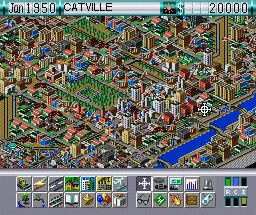
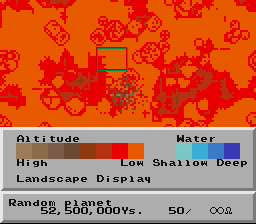
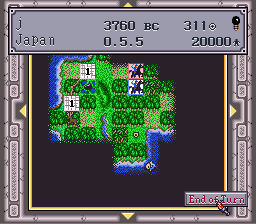
SimCity (also known as the retronyms Micropolis or SimCity Classic) is a city-building simulation video game developed by Will Wright, and released for several platforms from 1989 to 1991. SimCity features two-dimensional graphics and an overhead perspective. The game's objective is to create a city, develop residential and industrial areas, build infrastructure, and collect taxes for further city development. Importance is placed on increasing the population's standard of living, maintaining a balance between the different sectors, and monitoring the region's environmental situations to prevent the settlement from declining and going bankrupt.
SimCity was independently developed by Will Wright, beginning in 1985; the game was not released until 1989. Because the game lacked any arcade or action elements that dominated the video game market in the 1980s, video game publishers declined to release the title for fear of its commercial failure until Broderbund eventually agreed to distribute it. Although the game initially sold poorly, positive feedback from the gaming press boosted its sales. After becoming a best-seller, SimCity was released on several other platforms, most notably on the Super Nintendo Entertainment System (SNES) in 1991. Its gameplay was significantly revised with Nintendo's involvement.
From Wikipedia's article SimCity (1989 video game)
Keyboard controls
| SNES | Player 1 | Player 2 |
|---|---|---|
| D-pad | ↑↓←→ | IKJL |
| A | Z | M |
| B | X | N |
| X | A | U |
| Y | S | H |
| L | Q | Y |
| R | E | O |
| Select | Shift | B |
| Start | Enter | Space |
Hotkeys
- 1 Quick save state
- 2 Quick load state
- 3 Change save slot
Gamepads are detected when you press a button. Remap any key from the emulator’s Controls menu (gear icon).
Online, both players use the Player 1 keys (or a gamepad) on their own computer. Saving, loading and pausing are off while you play online.
From the manual, page 6
Live chat
Connecting…
Keyboard controls
| SNES | Player 1 | Player 2 |
|---|---|---|
| D-pad | ↑↓←→ | IKJL |
| A | Z | M |
| B | X | N |
| X | A | U |
| Y | S | H |
| L | Q | Y |
| R | E | O |
| Select | Shift | B |
| Start | Enter | Space |
Hotkeys
- 1 Quick save state
- 2 Quick load state
- 3 Change save slot
Gamepads are detected when you press a button. Remap any key from the emulator’s Controls menu (gear icon).
Online, both players use the Player 1 keys (or a gamepad) on their own computer. Saving, loading and pausing are off while you play online.
From the manual, page 6
4.0 Great job!
Critics 84 · 3 reviews
Review scorecard
- Graphics 4.0 out of 5 Overall fallback
- Sound 4.0 out of 5 Overall fallback
- Control 4.0 out of 5 Overall fallback
- Fun Factor 4.0 out of 5 Overall fallback
Overall fallback: Critics 84 · 3 reviews. Overall source The same 84/100 overall rating fills missing categories using the face scale; these are not separate category scores.
What the reviews talk about
Key wordsstrategicrealisticchallenging
What the critics said
Macworld, in their review, praised its graphics as well as its strategic gameplay, calling it "A challenging, dynamic game, realistic and unpredictable", and notes how "as the population grows the city's needs change."
— Macworld, 1989
Macworld called SimCity "an intricate and intriguing game".
— Macworld, 1989
Johnny L. Wilson reviewed the game for Computer Gaming World, and stated that "Dynamic is exactly the right word for this product. There is constant strategy involved in the placement of zones, road building, political decision-making, and damage control."
— Computer Gaming World, 1989
From the Reception section of Wikipedia's SimCity (1989 video game) article.
Scores
- 94 Mean Machines 94% (SNES)
- 83 Famitsu 9/10, 8/10, 9/10, 7/10 (SFC)
- 75 Electronic Gaming Monthly1991 7/10, 9/10, 8/10, 6/10 (SNES)
- 95 AllGame 5/5 (PC) ; 4.5/5 (Macintosh) · other versions
From the review table in Wikipedia's SimCity (1989 video game) article.
Full reviews
Play online
Play with a friend on another computer. Host a room and send them the link, or list it in Open rooms for anyone to join; they play as Player 2 and you both see the same game.
Press Start Game first.
Go live
Let anyone watch you play, live in their browser. They see your game as you play it, and your online game when you host a room.
Press Start Game first.


Comments