Pilotwings
88K plays 1990 #Action#Shooter#Simulation
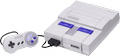
Pilotwings is a flight simulation video game developed and published by Nintendo for the Super Nintendo Entertainment System. The game was originally released in Japan in December 1990, shortly after the launch of the Super Famicom in the country. It was also released as a launch title for the SNES in August 1991 in North America, with a European release following in 1992.
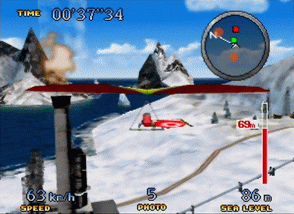
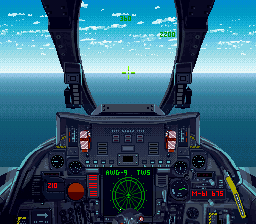
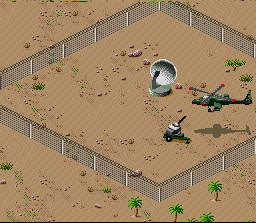
In Pilotwings, the player attempts to earn pilot licenses through lessons in light plane flight, hang gliding, skydiving, and the use of a rocket belt. Bonus stages and levels involving an attack helicopter are also available. Each event offers unique controls and gameplay mechanics. To increase the realism of the game's flight simulation, the developers extensively utilized the SNES's Mode 7 capability, which mimics 3D graphics by rotating and scaling flat objects.
The game was well-received upon its release, largely thanks to its graphical presentation. The game has since been re-released for the Wii and Wii U Virtual Console and the Nintendo Classics service in PAL regions, North America, and Japan, as well as New Nintendo 3DS in North America. A sequel, Pilotwings 64, was released for the Nintendo 64 in 1996. After many years of announcements and cancellations, Nintendo released a second sequel, Pilotwings Resort, in 2011 for the Nintendo 3DS.
From Wikipedia's article Pilotwings (video game)
Keyboard controls
| SNES | Player 1 | Player 2 |
|---|---|---|
| D-pad | ↑↓←→ | IKJL |
| A | Z | M |
| B | X | N |
| X | A | U |
| Y | S | H |
| L | Q | Y |
| R | E | O |
| Select | Shift | B |
| Start | Enter | Space |
Hotkeys
- 1 Quick save state
- 2 Quick load state
- 3 Change save slot
Gamepads are detected when you press a button. Remap any key from the emulator’s Controls menu (gear icon).
Online, both players use the Player 1 keys (or a gamepad) on their own computer. Saving, loading and pausing are off while you play online.
From the manual, page 3
Live chat
Connecting…
Keyboard controls
| SNES | Player 1 | Player 2 |
|---|---|---|
| D-pad | ↑↓←→ | IKJL |
| A | Z | M |
| B | X | N |
| X | A | U |
| Y | S | H |
| L | Q | Y |
| R | E | O |
| Select | Shift | B |
| Start | Enter | Space |
Hotkeys
- 1 Quick save state
- 2 Quick load state
- 3 Change save slot
Gamepads are detected when you press a button. Remap any key from the emulator’s Controls menu (gear icon).
Online, both players use the Player 1 keys (or a gamepad) on their own computer. Saving, loading and pausing are off while you play online.
From the manual, page 3
4.0 Great job!
GameRankings 82%
Review scorecard
- Graphics 4.0 out of 5 Overall fallback
- Sound 4.0 out of 5 Overall fallback
- Control 4.0 out of 5 Overall fallback
- Fun Factor 4.0 out of 5 Overall fallback
Overall fallback: GameRankings 82%. Overall source The same 82/100 overall rating fills missing categories using the face scale; these are not separate category scores.
What the reviews talk about
Key wordsrewardingstunningenjoyableoriginal
What the critics said
Official Nintendo Magazine remarked in 2009, "This early SNES title is still enjoyable enough to be considered a true classic."
— Official Nintendo Magazine, 2009
From the Reception section of Wikipedia's Pilotwings (video game) article.
Scores
- 100 GamePro 5/5 (SNES)
- 92 Super Play1992 92% (SNES)
- 91 SNES Force1993 91%
- 91 Total!1992 91% (SNES)
- 90 Mean Machines1991 90% (SNES)
- 85 Entertainment Weekly B+
- 83 Game Informer2007 8.25/10 (SNES)
- 78 Electronic Gaming Monthly1992 7.75/10 (SNES)
- 76 Nintendo Power1991 3.8/5 (SNES)
- 73 Famitsu1990 8/10, 7/10, 8/10, 6/10 (SNES) ; 7/10, 8/10, 8/10, 7/10
- 70 Nintendo Life2019 7/10 (SNES)
- 90 Official Nintendo Magazine2009 90% (Wii) · other versions
- 75 IGN2010 7.5/10 (Wii) · other versions
From the review table in Wikipedia's Pilotwings (video game) article.
Full reviews
Play online
Play with a friend on another computer. Host a room and send them the link, or list it in Open rooms for anyone to join; they play as Player 2 and you both see the same game.
Press Start Game first.
Go live
Let anyone watch you play, live in their browser. They see your game as you play it, and your online game when you host a room.
Press Start Game first.
Comments