Desert Strike: Return to the Gulf

62K plays 1992 #Action#Shooter
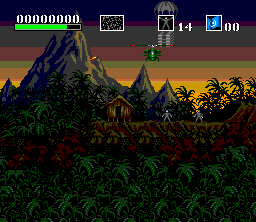
Desert Strike: Return to the Gulf is a shoot 'em up video game released by Electronic Arts (EA) in 1992 for the Sega Genesis. The game was released on several other formats such as the Super Nintendo Entertainment System, including a much upgraded version for the Amiga home computer. The game was inspired by the Gulf War and depicts a conflict between an insane Middle Eastern dictator, General Kilbaba, and the United States. The player controls an Apache helicopter and attempts to destroy enemy weapons and installations, rescue hostages and capture enemy personnel, while managing supplies of fuel and ammunition.
Lead designer Mike Posehn had no video game experience prior to developing Desert Strike. Inspired by Choplifter, he aimed to create a nonlinear game with smoothly animated vehicles. Posehn developed a camera system with momentum to mimic realistic helicopter movements. Three-dimensional (3D) modeling was used to generate the vehicle sprites, which were later touched up on the pixel level with color.
From Wikipedia's article Desert Strike, licensed under CC BY-SA 4.0
Keyboard controls
| SNES | Player 1 | Player 2 |
|---|---|---|
| D-pad | ↑↓←→ | IKJL |
| A | Z | M |
| B | X | N |
| X | A | U |
| Y | S | H |
| L | Q | Y |
| R | E | O |
| Select | Shift | B |
| Start | Enter | Space |
Hotkeys
- 1 Quick save state
- 2 Quick load state
- 3 Change save slot
Gamepads are detected when you press a button. Remap any key from the emulator’s Controls menu (gear icon).
Online, both players use the Player 1 keys (or a gamepad) on their own computer. Saving, loading and pausing are off while you play online.
Live chat
Connecting…
Keyboard controls
| SNES | Player 1 | Player 2 |
|---|---|---|
| D-pad | ↑↓←→ | IKJL |
| A | Z | M |
| B | X | N |
| X | A | U |
| Y | S | H |
| L | Q | Y |
| R | E | O |
| Select | Shift | B |
| Start | Enter | Space |
Hotkeys
- 1 Quick save state
- 2 Quick load state
- 3 Change save slot
Gamepads are detected when you press a button. Remap any key from the emulator’s Controls menu (gear icon).
Online, both players use the Player 1 keys (or a gamepad) on their own computer. Saving, loading and pausing are off while you play online.
Play online
Play with a friend on another computer. Host a room and send them the link; they join as Player 2 and you both see the same game.
Press Start Game first.
Go live
Let anyone watch you play, live in their browser. They see your game as you play it, and your online game when you host a room.
Press Start Game first.
Comments