Mecarobot Golf

0 plays 1993 #Sport
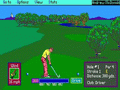
Mecarobot Golf is an arcade-style golf video game released for the Super Nintendo Entertainment System. The game was originally released in Japan as Serizawa Nobuo no Birdie Try (芹沢信雄のバーディトライ; "Nobuo Serizawa's Birdy Try").
The general theme of Mecarobot Golf is a near-futuristic golf course where humanoid robots are considered to be second-class citizens. A robot named Eagle is banned from participating in the world's professional golfing tournaments due to discrimination. Eagle has the ability to play golf better than a human being, but is denied the chance to play with human individuals. A benefactor purchases Eagle and builds a golf course for him to practice on. The player's skill determine whether humans or robots are truly better at golf. Various modes (lesson, driving range, competition) help the player practice his abilities that he will need in future matches.
Japanese professional golfer Nobuo Serizawa endorsed the Japanese version of the game. However, the Western version of the game replaced his likeness with Eagle the robot. There are two possible background sounds that can be played while golfing; a simple tune for relaxation or a complex melody for "excitement."
From Wikipedia's article Mecarobot Golf, licensed under CC BY-SA 4.0
Keyboard controls
| SNES | Player 1 | Player 2 |
|---|---|---|
| D-pad | ↑↓←→ | IKJL |
| A | Z | M |
| B | X | N |
| X | A | U |
| Y | S | H |
| L | Q | Y |
| R | E | O |
| Select | Shift | B |
| Start | Enter | Space |
Hotkeys
- 1 Quick save state
- 2 Quick load state
- 3 Change save slot
Gamepads are detected when you press a button. Remap any key from the emulator’s Controls menu (gear icon).
Online, both players use the Player 1 keys (or a gamepad) on their own computer. Saving, loading and pausing are off while you play online.
Live chat
Connecting…
Keyboard controls
| SNES | Player 1 | Player 2 |
|---|---|---|
| D-pad | ↑↓←→ | IKJL |
| A | Z | M |
| B | X | N |
| X | A | U |
| Y | S | H |
| L | Q | Y |
| R | E | O |
| Select | Shift | B |
| Start | Enter | Space |
Hotkeys
- 1 Quick save state
- 2 Quick load state
- 3 Change save slot
Gamepads are detected when you press a button. Remap any key from the emulator’s Controls menu (gear icon).
Online, both players use the Player 1 keys (or a gamepad) on their own computer. Saving, loading and pausing are off while you play online.
No reviews yet
We found no critic scores for this game, and too few players have rated it.
Review scorecard
- Graphics — Not scored Unavailable
- Sound — Not scored Unavailable
- Control — Not scored Unavailable
- Fun Factor — Not scored Unavailable
No category score or overall rating is available for the unscored slots.
Full reviews
Play online
Play with a friend on another computer. Host a room and send them the link, or list it in Open rooms for anyone to join; they play as Player 2 and you both see the same game.
Press Start Game first.
Go live
Let anyone watch you play, live in their browser. They see your game as you play it, and your online game when you host a room.
Press Start Game first.
Comments