Eliminator Boat Duel

39K plays 1991 #Racing
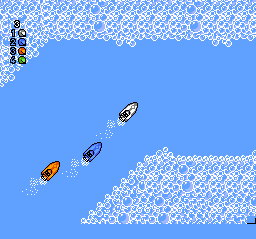
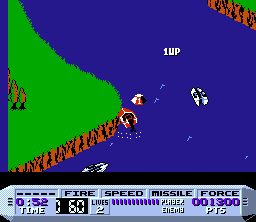
Eliminator Boat Duel is a powerboat racing video game developed for the Nintendo Entertainment System by Sculptured Software and Radioactive Software. It was published by Electro Brain in 1991. Drivers earn thousands of dollars by competing in powerboat races, setting track records, rescuing stranded people, and collecting cash bonuses. With these winnings they can repair or upgrade various components of the boat to improve racing performance and remain competitive in the increasingly difficult races.
Eliminator Boat Duel offers three difficulty levels: Easy, Normal, and Expert. Completing a race at a lower difficulty level advances the player to the next higher one. At each difficulty level, the player's boat can be damaged from impact with animals, the opponent's watercraft, and various stationary objects. A false start is penalized with a $2,000 fine.
For most of a race, players control their craft from a bird's-eye view, and the screen scrolls in multiple directions; but in one segment of the race, the graphical perspective changes to a third-person tracking mode.
In a single-player game, the player competes first with either Seasick Sidney (in Easy mode), with Aquarius Rex (in Normal mode), or with Surfer Bob (in Expert mode). The sequence of later opponents is Vicious Vicky, Weird Willy, Mangler Mike, Veronica Alabaster, and Disaster Don (the reigning World Champion). To win, the player must defeat each opponent one-against-one on three unique race courses. In all, Eliminator Boat Duel has 24 unique race courses.
Text: Wikipedia via RetroGames.cz, licensed under CC BY-SA 3.0
Keyboard controls
| NES | Player 1 | Player 2 |
|---|---|---|
| D-pad | ↑↓←→ | IKJL |
| B | Z | N |
| A | X | M |
| Select | Shift | B |
| Start | Enter | Space |
Hotkeys
- 1 Quick save state
- 2 Quick load state
- 3 Change save slot
Gamepads are detected when you press a button. Remap any key from the emulator’s Controls menu (gear icon).
Live chat
Connecting…
Keyboard controls
| NES | Player 1 | Player 2 |
|---|---|---|
| D-pad | ↑↓←→ | IKJL |
| B | Z | N |
| A | X | M |
| Select | Shift | B |
| Start | Enter | Space |
Hotkeys
- 1 Quick save state
- 2 Quick load state
- 3 Change save slot
Gamepads are detected when you press a button. Remap any key from the emulator’s Controls menu (gear icon).

Comments