Basketball

62K plays 1978 #Sport
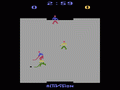
Basketball is an Atari 2600 game loosely based on the sport of the same name. The game features a simple game of one-on-one basketball, playable by one or two players.
At the start of the game, both players are at the center of the court. A jump ball is thrown between them, at which point play begins. The offensive player (the one with the ball) always faces the goal he's shooting at, and the defensive player always faces his opponent. Each player can move in eight directions with the joystick; the player with the ball constantly dribbles it. The defensive player may steal the ball when it leaves the opponent's hands (either in mid-dribble or mid-shot).
After either player scores, the shooter is reset to the center of the court, where he will start defending his opponent, and the defender is set under the basket to inbound the ball and take an offensive chance. The player with the highest score after four minutes is the winner.
The game features two difficulty levels using the Difficulty Switch on the Atari 2600. In 'B' position, the player can move from goal to goal much quickly than the 'A' position.
Text: Wikipedia via RetroGames.cz, licensed under CC BY-SA 3.0
Keyboard controls
| Atari 2600 | Player 1 | Player 2 |
|---|---|---|
| D-pad | ↑↓←→ | IKJL |
| Fire | Z | N |
| Game Select | Shift | |
| Game Reset | Enter |
Hotkeys
- 1 Quick save state
- 2 Quick load state
- 3 Change save slot
Most games start with Game Reset. Paddle games (Breakout, Kaboom!…) need a gamepad stick.
Gamepads are detected when you press a button. Remap any key from the emulator’s Controls menu (gear icon).
Live chat
Connecting…
Keyboard controls
| Atari 2600 | Player 1 | Player 2 |
|---|---|---|
| D-pad | ↑↓←→ | IKJL |
| Fire | Z | N |
| Game Select | Shift | |
| Game Reset | Enter |
Hotkeys
- 1 Quick save state
- 2 Quick load state
- 3 Change save slot
Most games start with Game Reset. Paddle games (Breakout, Kaboom!…) need a gamepad stick.
Gamepads are detected when you press a button. Remap any key from the emulator’s Controls menu (gear icon).



Comments