Atari Video Cube

28K plays 1982 #Puzzle
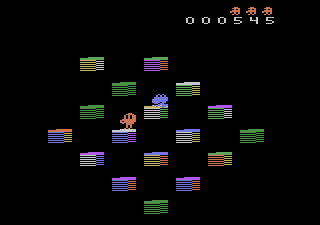
Atari Video Cube is a puzzle video game developed by GCC for the Atari 2600 and published by Atari, Inc. in 1982. Atari Video Cube was sold exclusively through the Atari Club, run by Atari, Inc. Originally an unlicensed interpretation of the Rubik's Cube toy, Atari re-released the game in 1984 as Rubik's Cube.
The game implements a Pocket Cube, Rubik's Cube, and Rubik's Revenge, The player takes control of the titular 'Hubie the cube master' who, (according to the atari 2600 game manual for Atari video cube) 'picks up' a color and drops it where the player decides. The cube is six sided, with 9 colors each side, red, blue, green, white, purple, orange.
Hubies task (aka the player) is to make all sides the same color, but it wont be so easy for poor hubie, as someone has switched all the colors around! finally, hubie has a thing about colors. if he carries a RED color he cannot walk into a RED square, for example.
The game has several different modes changable by the atari game selection switch, modes include blackout(the entire cube is black except when rotating), moving north and east only, as well as turbo, where hubie moves at super speeds. one of the challenges of the game is to beat the cube in as little moves as possible (shown in game at the bottom of the screen).
Text: Wikipedia via RetroGames.cz, licensed under CC BY-SA 3.0
Keyboard controls
| Atari 2600 | Player 1 | Player 2 |
|---|---|---|
| D-pad | ↑↓←→ | IKJL |
| Fire | Z | N |
| Game Select | Shift | |
| Game Reset | Enter |
Hotkeys
- 1 Quick save state
- 2 Quick load state
- 3 Change save slot
Most games start with Game Reset. Paddle games (Breakout, Kaboom!…) need a gamepad stick.
Gamepads are detected when you press a button. Remap any key from the emulator’s Controls menu (gear icon).
Live chat
Connecting…
Keyboard controls
| Atari 2600 | Player 1 | Player 2 |
|---|---|---|
| D-pad | ↑↓←→ | IKJL |
| Fire | Z | N |
| Game Select | Shift | |
| Game Reset | Enter |
Hotkeys
- 1 Quick save state
- 2 Quick load state
- 3 Change save slot
Most games start with Game Reset. Paddle games (Breakout, Kaboom!…) need a gamepad stick.
Gamepads are detected when you press a button. Remap any key from the emulator’s Controls menu (gear icon).

Comments