Wayne Gretzky’s 3D Hockey
55K plays 1996 #Sport
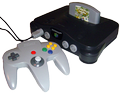
Wayne Gretzky's 3D Hockey is a video game developed by Williams Entertainment, published by Atari Games for the arcade in 1996. A port for the Nintendo 64 console was released almost simultaneously with the arcade version, on November 11, 1996, making it the first-ever 4-player game for the Nintendo 64. The game was subsequently re-released as Wayne Gretzky's 3D Hockey '98 (also ported to the PlayStation) and later in an Olympic version.
As opposed to the more realistic ice hockey gameplay seen in Electronic Arts' NHL series, Wayne Gretzky's 3D Hockey features arcade-style gameplay, with moves such as 'power saves', which cause the goaltender to briefly transform into a brick wall, 'power shots', which set the net on fire or knock the goalie into the net, and 'power checks', which send an ambulance across the top of the screen. It features high-scoring games and over-the-top fights. There is also a simulation mode for those looking for more realistic gameplay. The game allowed the creation of profiles and would keep track of important individual and team stats, including goals, assists, and wins, among others.
Text: Wikipedia via RetroGames.cz, licensed under CC BY-SA 3.0
Keyboard controls
| N64 | Player 1 |
|---|---|
| Stick | ↑↓←→ |
| A | X |
| B | C |
| Z | Z |
| L | A |
| R | S |
| C buttons | IKJL |
| D-pad | TGFH |
| Start | Enter |
Hotkeys
- 1 Quick save state
- 2 Quick load state
- 3 Change save slot
A gamepad with an analog stick plays much better than the keyboard.
Gamepads are detected when you press a button. Remap any key from the emulator’s Controls menu (gear icon).
Live chat
Connecting…
Keyboard controls
| N64 | Player 1 |
|---|---|
| Stick | ↑↓←→ |
| A | X |
| B | C |
| Z | Z |
| L | A |
| R | S |
| C buttons | IKJL |
| D-pad | TGFH |
| Start | Enter |
Hotkeys
- 1 Quick save state
- 2 Quick load state
- 3 Change save slot
A gamepad with an analog stick plays much better than the keyboard.
Gamepads are detected when you press a button. Remap any key from the emulator’s Controls menu (gear icon).
Comments