The Legend of Zelda
0 plays 1987 #RPG
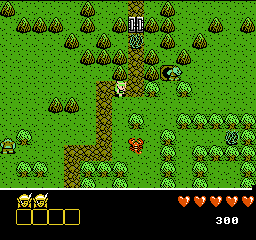
The Legend of Zelda is a 1986 action-adventure game developed and published by Nintendo for the Family Computer Disk System. It is the first game in the Legend of Zelda series. It is set in the fantasy land of Hyrule and centers on an elf-like boy named Link, who aims to collect the eight fragments of the Triforce of Wisdom to rescue Princess Zelda from Ganon. The player controls Link from a top-down perspective and navigates the overworld and dungeons, collecting weapons, defeating enemies and uncovering secrets. It was designed and directed by Shigeru Miyamoto and Takashi Tezuka, being in development alongside Super Mario Bros., which was released on September 13, 1985.
The Legend of Zelda was released in Japan as a launch game for the Family Computer Disk System on February 21, 1986. More than a year later, in late 1987, it was released in North America and Europe on the Nintendo Entertainment System in cartridge format by which time a sequel had already been released in Japan. The US version was one of the first games to include an internal battery for saving data. This version was released in Japan on February 19, 1994 as Zelda no Densetsu 1.
From Wikipedia's article The Legend of Zelda (video game)
Keyboard controls
| NES | Player 1 | Player 2 |
|---|---|---|
| D-pad | ↑↓←→ | IKJL |
| B | Z | N |
| A | X | M |
| Select | Shift | B |
| Start | Enter | Space |
Hotkeys
- 1 Quick save state
- 2 Quick load state
- 3 Change save slot
Gamepads are detected when you press a button. Remap any key from the emulator’s Controls menu (gear icon).
Online, both players use the Player 1 keys (or a gamepad) on their own computer. Saving, loading and pausing are off while you play online.
Live chat
Connecting…
Keyboard controls
| NES | Player 1 | Player 2 |
|---|---|---|
| D-pad | ↑↓←→ | IKJL |
| B | Z | N |
| A | X | M |
| Select | Shift | B |
| Start | Enter | Space |
Hotkeys
- 1 Quick save state
- 2 Quick load state
- 3 Change save slot
Gamepads are detected when you press a button. Remap any key from the emulator’s Controls menu (gear icon).
Online, both players use the Player 1 keys (or a gamepad) on their own computer. Saving, loading and pausing are off while you play online.
4.5 Great job!
Critics 87 · 10 reviews
Review scorecard
- Graphics 4.5 out of 5 Overall fallback
- Sound 4.5 out of 5 Overall fallback
- Control 4.5 out of 5 Overall fallback
- Fun Factor 4.5 out of 5 Overall fallback
Overall fallback: Critics 87 · 10 reviews. Overall source The same 87/100 overall rating fills missing categories using the face scale; these are not separate category scores.
What the reviews talk about
Key wordssmoothcharmingdifficultexcellentdeepdated
What the critics said
They called it "an incredibly rich, deep gaming experience that goes far beyond the typical cartridge game" with appeal "to both male and female players" of all ages, making it a "must-have" for every Nintendo owner.
— Computer Entertainer, 1987
The staff praised its "mix of complexity, open world design, and timeless graphics".
— GamesRadar+, 2012
From the Reception section of Wikipedia's The Legend of Zelda (video game) article.
Scores
- 99 RPGFan2001 99%; 85%
- 97 Famicom Hisshoubon1986 4.5/5, 5/5, 5/5 ;
- 95 Jeuxvideo.com2009 19/20; 19/20
- 94 Computer Entertainer1987 4/4, 3.5/4
- 91 ACE1989 905/1000
- 90 Computer and Video Games1988 9/10
- 84 Video Games (DE)1991 84%
- 80 Dragon 4/5
- 78 Total! 78%
- 68 Famitsu1991 8/10, 7/10, 8/10, 7/10 (FDS) ; ; 8/10, 6/10, 7/10, 6/10
- 90 IGN2007 9/10 · other versions
- 80 Eurogamer2007 4/5 · other versions
- 80 Nintendo Life2006 8/10 · other versions
- 72 GameSpot2006 7.2/10 · other versions
From the review table in Wikipedia's The Legend of Zelda (video game) article.
Full reviews
Play online
Play with a friend on another computer. Host a room and send them the link, or list it in Open rooms for anyone to join; they play as Player 2 and you both see the same game.
Press Start Game first.
Go live
Let anyone watch you play, live in their browser. They see your game as you play it, and your online game when you host a room.
Press Start Game first.
Comments