RoboCop 2

64K plays 1991 #Action#Platform#Shooter
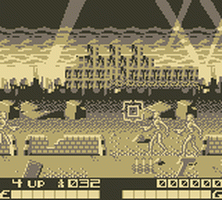
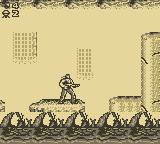
RoboCop 2 is an arcade game developed and published in 1991 by Data East, which allows up to two players at once (one controlling the original RoboCop, the other controlling a slightly purple-hued clone). The game follows the basic premise of the movie, but has some major sequential differences. It is mostly side-scrolling shoot-em-up, with some levels viewed from behind RoboCop and providing a targeting reticle with which to kill generic criminals.
There is a series of video games published in the 1990s by Ocean and Data East for various home computers and video game consoles. They are based on the movie of the same name. Three different home versions of the game were produced, each on two systems.
The version for the Commodore 64 and NES is a simple left-to-right scrolling platformer, in which RoboCop is required to collect/destroy at least two-thirds of the drug 'nuke' in each level and arrest two-thirds of the suspects by running into them (in contrast to shooting them). If RoboCop does not manage to attain the required amounts of nuke or number of arrests then he has two chances in the game to prove his efficiency at a shooting range. If he succeeds, he may continue onto the next level. If he fails, or if both chances at the shooting range are already used up, he must repeat the level.
The ZX Spectrum and Amstrad GX4000 versions are also platform games, but offered movement in both directions (vertically and horizontally) as well as into various areas providing an element of exploration. There is also a number of puzzle sub-games that have to be completed to progress in the game.
The version for the 16-bit Commodore Amiga and Atari ST is similar in nature to the 8-bit Spectrum and Amstrad GX4000 versions, but contains completely different levels to take advantage of the extra power offered by these computers.
Text: Wikipedia via RetroGames.cz, licensed under CC BY-SA 3.0
Keyboard controls
| Game Boy | Player 1 |
|---|---|
| D-pad | ↑↓←→ |
| B | Z |
| A | X |
| Select | Shift |
| Start | Enter |
Hotkeys
- 1 Quick save state
- 2 Quick load state
- 3 Change save slot
Gamepads are detected when you press a button. Remap any key from the emulator’s Controls menu (gear icon).
Live chat
Connecting…
Keyboard controls
| Game Boy | Player 1 |
|---|---|
| D-pad | ↑↓←→ |
| B | Z |
| A | X |
| Select | Shift |
| Start | Enter |
Hotkeys
- 1 Quick save state
- 2 Quick load state
- 3 Change save slot
Gamepads are detected when you press a button. Remap any key from the emulator’s Controls menu (gear icon).


Comments