Night Driver

26K plays 1976 #Racing
Night Driver is an arcade game developed by Atari for release in the United States in October 1976. Night Driver is one of the earliest first-person racing video games and is commonly believed to be one of the first published video games to display real-time first-person graphics. The player controls a car which must be driven along a road at nighttime without crashing into the sides of the road as indicated by road side reflectors. The game is controlled with a single pedal for the accelerator, a wheel for steering and a four-selection lever for gear shifting. The coin-operated game had a choice of three difficulties (novice, pro and expert), which the player could select at game start. The turns were sharper and more frequent on the more difficult tracks. As play progresses, the road gets narrower and more winding.
The game length could be set by the owner to 50, 75, 100 or 125 seconds. After 300 points, a player is awarded bonus time equal to game time, but the score wraps around back to zero at 1000 points, so it is possible to reach 300 points more than once. Due to the additional points received for more difficult play, playing on the expert setting is actually the easiest to achieve extra time once a player has mastered the game.
The car the player is driving is not actually drawn on-screen. Instead, the car is a printed plastic insert that is laid under the screen. Also, the fact that the car is driving at night made it easier for the programmers to draw the environment with limited graphics at the time, as most features (street, buildings...) didn't need to be drawn because they were supposedly completely dark.
The arcade game began production in October 1976. Atari demonstrated the game at the AMOA show in November 1976, where it was one of several driving games demonstrated by Atari along with Sprint 2 and Namco's electro-mechanical F-1; the most talked-about driving game at the show was F-1. Night Driver also drew comparisons to Midway Manufacturing's Midnight Racer (later re-branded Datsun 280 ZZZAP) at the same show and an earlier German night driving video game (Nürburgring 1) demonstrated at the German IMA show in Spring 1976.
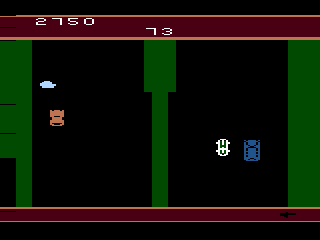
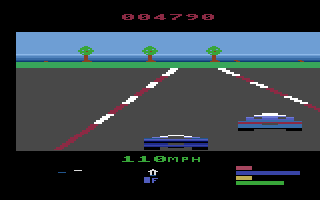
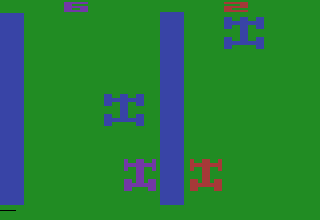
Atari released a conversion for the Atari VCS, later renamed the Atari 2600, in 1980. It was programmed by Rob Fulop, who added colour and several new features, including other vehicles that the player must avoid, as well as houses and trees beside the road. The player normally holds the fire button to accelerate and uses a paddle controller to steer, while gear shifting is not available in this version. Because the original paddle-based steering is not practical in the web emulator used on this website and made the game essentially unplayable, the emulated version presented here uses a modified ROM in which the controls have been reprogrammed for a standard joystick. The left and right directions steer the car, while the fire button remains the accelerator; the remaining graphics, rules and gameplay are unchanged. The Atari 2600 version offers eight variations, several of which are timed and require the player to score as many points as possible within 90 seconds. Commodore published a version for the Commodore 64 in 1982.
Text: RetroGames.cz, licensed under CC BY-SA 3.0
Keyboard controls
| Atari 2600 | Player 1 | Player 2 |
|---|---|---|
| D-pad | ↑↓←→ | IKJL |
| Fire | Z | N |
| Game Select | Shift | |
| Game Reset | Enter |
Hotkeys
- 1 Quick save state
- 2 Quick load state
- 3 Change save slot
Most games start with Game Reset. Paddle games (Breakout, Kaboom!…) need a gamepad stick.
Gamepads are detected when you press a button. Remap any key from the emulator’s Controls menu (gear icon).
Live chat
Connecting…
Keyboard controls
| Atari 2600 | Player 1 | Player 2 |
|---|---|---|
| D-pad | ↑↓←→ | IKJL |
| Fire | Z | N |
| Game Select | Shift | |
| Game Reset | Enter |
Hotkeys
- 1 Quick save state
- 2 Quick load state
- 3 Change save slot
Most games start with Game Reset. Paddle games (Breakout, Kaboom!…) need a gamepad stick.
Gamepads are detected when you press a button. Remap any key from the emulator’s Controls menu (gear icon).




Comments