NFL

12K plays 1989 #Sport
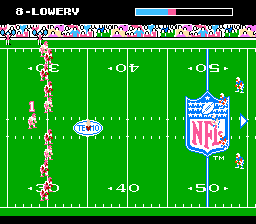
NFL is a 1989 football video game, developed by Atlus and published by LJN exclusively for the Nintendo Entertainment System. This game was the first since NFL Football - released in 1979 for the Intellivision - to get an official National Football League license. Intending to loosely represent the 1988-89 season of the National Football League, the game uses the teams and play formations of that particular era while avoiding usage of the players' names, due to a lack of an NFLPA license, which was given to Tecmo's Tecmo Bowl.
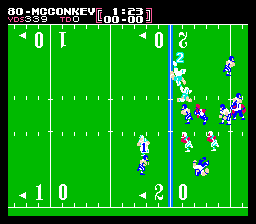
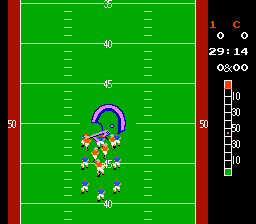
The player could play one of four options, either Interconference, AFC and NFC game or the Super Bowl (specifically Super Bowl XXIII). Along with the option to choose a package to play during the game, players can directly control the entire team at once. This game was one of the first NFL video games on a gaming system. The game employs a Top-Down system for the actual gameplay and allows players to assign handicaps to a human opponent that is not as skilled as they are.
The player is in control of the action from a side-scrolling perspective. The camera also zooms in for closeups on receiving plays. However, NFL is also a very strategic, coaching-oriented take on the sport, featuring large playbooks (team plays are included on a separate fold-out sheet bundled with the game manual, but not onscreen in the game itself), limited customization of team skills, and penalties.
Text: Wikipedia via RetroGames.cz, licensed under CC BY-SA 3.0
Keyboard controls
| NES | Player 1 | Player 2 |
|---|---|---|
| D-pad | ↑↓←→ | IKJL |
| B | Z | N |
| A | X | M |
| Select | Shift | B |
| Start | Enter | Space |
Hotkeys
- 1 Quick save state
- 2 Quick load state
- 3 Change save slot
Gamepads are detected when you press a button. Remap any key from the emulator’s Controls menu (gear icon).
Live chat
Connecting…
Keyboard controls
| NES | Player 1 | Player 2 |
|---|---|---|
| D-pad | ↑↓←→ | IKJL |
| B | Z | N |
| A | X | M |
| Select | Shift | B |
| Start | Enter | Space |
Hotkeys
- 1 Quick save state
- 2 Quick load state
- 3 Change save slot
Gamepads are detected when you press a button. Remap any key from the emulator’s Controls menu (gear icon).
Comments