Knight Lore

36K plays 1984 #Action#Adventure
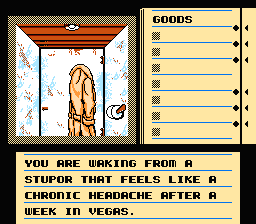
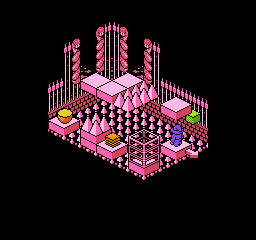
Knight Lore is a 1984 action-adventure game developed and published by Ultimate Play the Game, and written by company founders Chris and Tim Stamper. The game is known for its use of isometric graphics, which it further popularized in video games. In Knight Lore, the player character Sabreman has forty days to collect objects throughout a castle and brew a cure to his werewolf curse. Each castle room is depicted in monochrome on its own screen and consists of blocks to climb, obstacles to avoid, and puzzles to solve.
Ultimate released Knight Lore third in the Sabreman series but later claimed to have completed it first and withheld its release for a year to position the company advantageously in anticipation of the game's effect on the market. Knight Lore's novel image masking technique, Filmation, let images appear to pass atop and behind each other without their contents colliding. This created the illusion of depth priority, which the computer did not natively support. By delaying Knight Lore's release, Ultimate protected sales of their then-upcoming Sabre Wulf and created another Filmation game before other developers could copy the style. Ultimate released the original Sabreman trilogy in quick succession in 1984 for the ZX Spectrum. Knight Lore came last, in November. Ports followed for the BBC Micro, Amstrad CPC, MSX, and Family Computer Disk System.
From Wikipedia's article Knight Lore
Keyboard controls
| NES | Player 1 | Player 2 |
|---|---|---|
| D-pad | ↑↓←→ | IKJL |
| B | Z | N |
| A | X | M |
| Select | Shift | B |
| Start | Enter | Space |
Hotkeys
- 1 Quick save state
- 2 Quick load state
- 3 Change save slot
Gamepads are detected when you press a button. Remap any key from the emulator’s Controls menu (gear icon).
Online, both players use the Player 1 keys (or a gamepad) on their own computer. Saving, loading and pausing are off while you play online.
Live chat
Connecting…
Keyboard controls
| NES | Player 1 | Player 2 |
|---|---|---|
| D-pad | ↑↓←→ | IKJL |
| B | Z | N |
| A | X | M |
| Select | Shift | B |
| Start | Enter | Space |
Hotkeys
- 1 Quick save state
- 2 Quick load state
- 3 Change save slot
Gamepads are detected when you press a button. Remap any key from the emulator’s Controls menu (gear icon).
Online, both players use the Player 1 keys (or a gamepad) on their own computer. Saving, loading and pausing are off while you play online.
4.0 Great job!
Eurogamer 8/10 · 1 review
Review scorecard
- Graphics 4.0 out of 5 Overall fallback
- Sound 4.0 out of 5 Overall fallback
- Control 4.0 out of 5 Overall fallback
- Fun Factor 4.0 out of 5 Overall fallback
Overall fallback: Eurogamer 8/10 · 1 review. Overall source The same 80/100 overall rating fills missing categories using the face scale; these are not separate category scores.
What the reviews talk about
Key wordsoriginal
What the critics said
Knight Lore's atmosphere, which Sinclair User described as a "crepuscular world of claustrophobic menace", inspired many curious questions on the part of the adventurer in contemporaneous 1985 reviews.
— Sinclair User
From the Reception section of Wikipedia's Knight Lore article.
Scores
- 80 Eurogamer 8/10
- 95 Amstrad Action Amstrad: 95% · other versions
- 94 Crash Spectrum: 94% · other versions
- 93 Your Spectrum Spectrum: 14/15 · other versions
- 91 Amtix Amstrad: 91% · other versions
- 90 Computer and Video Games Spectrum: 9/10 · other versions
- 90 Sinclair User Spectrum: 9/10 · other versions
From the review table in Wikipedia's Knight Lore article.
Full reviews
Play online
Play with a friend on another computer. Host a room and send them the link, or list it in Open rooms for anyone to join; they play as Player 2 and you both see the same game.
Press Start Game first.
Go live
Let anyone watch you play, live in their browser. They see your game as you play it, and your online game when you host a room.
Press Start Game first.

Comments