Gradius (Nemesis)

148K plays 1985 #Action#Shooter
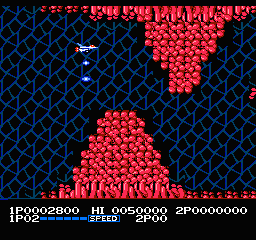
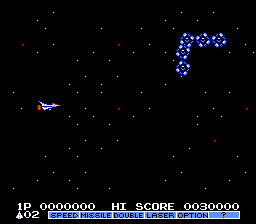
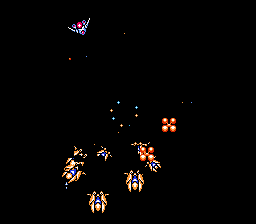
Gradius is a 1985 horizontally scrolling shooter video game developed and published by Konami for arcades. It is the first installment in the Gradius series. The player maneuvers a spacecraft known as the Vic Viper that must defend itself from the various alien enemies. The game uses a power-up system called the "power meter", based upon collecting capsules to acquire additional weapons.
The arcade version of Gradius was initially released internationally outside Japan under the title of Nemesis, but subsequent home releases have since used the original title. During development, it had the working title Scramble 2, as it was originally intended to be a follow-up to Konami's earlier shooter Scramble (1981). Home versions were released for various platforms, such as the Nintendo Entertainment System, the MSX home computer, and the PC Engine. It was a major success in 1986, becoming the year's highest-grossing arcade game in London and one of Japan's top five table arcade games, while the Famicom port sold over a million copies in Japan that year. Nintendo released the NES version in arcades for the Nintendo VS. System as VS. Gradius and PlayChoice-10 in November 1986.
Gradius was critically acclaimed for its gameplay and at the time unique power-up system. Along with Namco's Xevious, it is cited as being one of the most important shooter games, having paved the way for many similar games to follow.
From Wikipedia's article Gradius (video game)
Keyboard controls
| NES | Player 1 | Player 2 |
|---|---|---|
| D-pad | ↑↓←→ | IKJL |
| B | Z | N |
| A | X | M |
| Select | Shift | B |
| Start | Enter | Space |
Hotkeys
- 1 Quick save state
- 2 Quick load state
- 3 Change save slot
Gamepads are detected when you press a button. Remap any key from the emulator’s Controls menu (gear icon).
Online, both players use the Player 1 keys (or a gamepad) on their own computer. Saving, loading and pausing are off while you play online.
From the manual, page 2
Live chat
Connecting…
Keyboard controls
| NES | Player 1 | Player 2 |
|---|---|---|
| D-pad | ↑↓←→ | IKJL |
| B | Z | N |
| A | X | M |
| Select | Shift | B |
| Start | Enter | Space |
Hotkeys
- 1 Quick save state
- 2 Quick load state
- 3 Change save slot
Gamepads are detected when you press a button. Remap any key from the emulator’s Controls menu (gear icon).
Online, both players use the Player 1 keys (or a gamepad) on their own computer. Saving, loading and pausing are off while you play online.
From the manual, page 2
5.0 Outstanding!
Critics 90 · 3 reviews
Review scorecard
- Graphics 5.0 out of 5 Overall fallback
- Sound 5.0 out of 5 Overall fallback
- Control 5.0 out of 5 Overall fallback
- Fun Factor 5.0 out of 5 Overall fallback
Overall fallback: Critics 90 · 3 reviews. Overall source The same 90/100 overall rating fills missing categories using the face scale; these are not separate category scores.
Scores
- 90 AllGame 4.5/5; 4.5/5
- 90 Computer and Video Games1985 Positive; 90%; 37/40; 37/40; 37/40
- 89 ACE1989 890/1000
- 100 Sinclair User 5/5 · other versions
- 80 Your Sinclair 8/10 · other versions
- 72 GameSpot 7.2/10 · other versions
- 70 IGN2007 7/10 · other versions
- 59 Crash 59% · other versions
From the review table in Wikipedia's Gradius (video game) article.
Full reviews
Play online
Play with a friend on another computer. Host a room and send them the link, or list it in Open rooms for anyone to join; they play as Player 2 and you both see the same game.
Press Start Game first.
Go live
Let anyone watch you play, live in their browser. They see your game as you play it, and your online game when you host a room.
Press Start Game first.

Comments