Digger Remastered
237K plays 1998 #Action
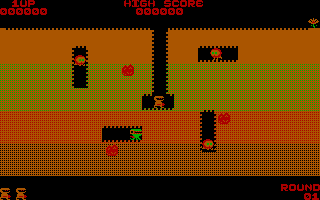
Digger was originally created by Windmill software in 1983 and released as a copy-protected, bootable 5.25' floppy disk for the IBM PC. As it requires a genuine CGA card, it didn't work on modern PCs. In 1998, I created Digger Remastered, which runs on all PCs with CGA or better and plays just like the original. It also has many new features, including:
* Exit button
* Optional VGA graphics
* Recording and playback
* Real time speed control
* Keyboard redefinition
* Gauntlet mode
* Two player simultaneous mode
Controls
--------
The keys you can use during the game are (by default):
* The cursor keys Up, Down, Left and Right (or 2, 4, 6, 8 on the numeric keypad if Num-lock is off) to move Digger.
* F1 to fire.
* Space to pause.
* F7 to toggle background music.
* F9 to toggle all sound.
* F10 to return to the title screen.
* + to increase the game speed by 5.
* - to decrease the game speed by 5.
* Ctrl-T (cheat) to take over whilst playing back a recorded game.
In two player mode the default keys for the second player are:
* W, A, S and Z to move Digger around.
* Tab to fire.
(Apologies to users of non-QWERTY keyboards - I know this is a terrible choice for you - you'll just have to redefine the keys.)
On the title screen press:
* Esc or N to toggle one or two player mode.
* F8 to save the last game if you didn't put a name on the command line.
* F10 to exit the program.
The game keys (not the title screen keys) can be redefined by specifying the /K option on the command line. For more information about this, see 'Command line options', below.
Joysticks are not yet supported in this version of Digger, but joystick support is planned for a future version - watch this space!
Text: RetroGames.cz, licensed under CC BY-SA 3.0
Controls
This is a PC game: it uses the keyboard the way it did under MS-DOS, and the mouse where the game supports it. Click the game screen first so it gets your key presses.
Many DOS games start with a menu or ask a question first — read the screen and answer with the keyboard. Arrow keys, Enter, Space, Ctrl and Alt are the usual game keys.
Live chat
Connecting…
Controls
This is a PC game: it uses the keyboard the way it did under MS-DOS, and the mouse where the game supports it. Click the game screen first so it gets your key presses.
Many DOS games start with a menu or ask a question first — read the screen and answer with the keyboard. Arrow keys, Enter, Space, Ctrl and Alt are the usual game keys.




Comments