Cycles, The: International Grand Prix Racing
The Cycles: International Grand Prix Racing is a 1989 computer game developed by Distinctive Software and published by Accolade. It has similarities to Grand Prix Circuit, except it is a motorcycle racing sim. The game includes all the tracks of 1989 Grand Prix motorcycle racing season. Laguna Seca and Goiania circuits are not available when you choose 125cc bike. It was released for the Amiga, Commodore 64, DOS, Amstrad CPC and ZX Spectrum.
As the name suggests, The Cycles simulates International Grand Prix Racing, allowing a player to compete against 9 computer rivals. Choose from three classes of bike (125, 250 and 500cc), and between 8 (Japan, Australia, USA, Spain, Italy, France,England and Sweden) and 15 (Japan, Australia, USA, Spain, Italy, Western Germany, Austria, Yugoslavia, Holland, Belgium, France, England, Sweden, Czechoslovakia and Brazil) original tracks depending on the version, at five difficulty levels (with the lower ones offering automatic gear changes).
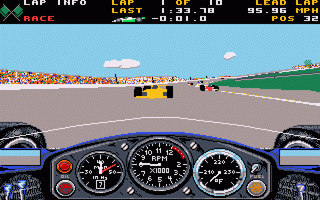
The player can enter single races (always including qualifying) or complete in a full season. The action is viewed from the handlebars of your bike, a novelty for motorcycle racing at the time. The game engine is similar to that used by Grand Prix Circuit, but now incorporates hills.
More like a simulation than an arcade game, unlike Sega's Hang-On and Super Hang-On, the player has no time limit to clear races. If the player crashes, they're out of the race. To win each race, the player must get through the finish lines. The player can change the number of laps for a race. The game has several modes which it can be played in:
Text: Wikipedia via RetroGames.cz, licensed under CC BY-SA 3.0
Controls
This is a PC game: it uses the keyboard the way it did under MS-DOS, and the mouse where the game supports it. Click the game screen first so it gets your key presses.
Many DOS games start with a menu or ask a question first — read the screen and answer with the keyboard. Arrow keys, Enter, Space, Ctrl and Alt are the usual game keys.

Comments