Clock Tower

0 plays 1995 #Adventure
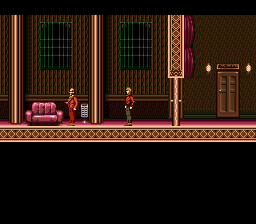
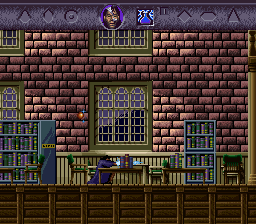
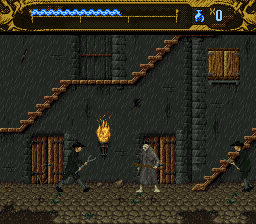
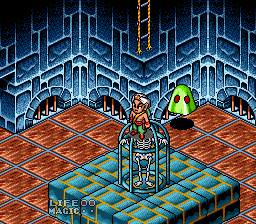
Clock Tower is a point-and-click survival horror video game developed and published by Human Entertainment for the Super Famicom in 1995. It is the first installment in the Clock Tower series. The story follows orphan Jennifer Simpson soon after she is adopted by the Barrows family along with other orphaned girls. Shortly after arriving at the Barrows family manor, one of the other children is killed by a stalker called Scissorman. Jennifer must then explore the Barrows Mansion to find a way to escape while evading Scissorman, leading to one of the game's multiple endings. Clock Tower utilizes a point-and-click interface with the player controlling a cursor to direct Jennifer's actions.
Much of Clock Tower's plot and artistic style are inspired by the works of Italian horror film director Dario Argento, most notably Phenomena (1985). Director Hifumi Kono loved horror films like this and wanted the game to feel like one. Many of the game's character graphics were digitized from photos of real people. Jennifer's movements were constructed from a woman in Human's planning division acting out the scenes. Her design was inspired by Jennifer Connelly's character in Phenomena.
The game sold well upon release. In retrospective reviews, Clock Tower has been praised for its haunting atmosphere, but the puzzles and exploration have drawn criticism for being tedious. It is considered an influence on horror games and a pioneer of the survival horror genre.
It came out only in Japan; this version has an unofficial English fan translation.
From Wikipedia's article Clock Tower (1995 video game), licensed under CC BY-SA 4.0
Keyboard controls
| SNES | Player 1 | Player 2 |
|---|---|---|
| D-pad | ↑↓←→ | IKJL |
| A | Z | M |
| B | X | N |
| X | A | U |
| Y | S | H |
| L | Q | Y |
| R | E | O |
| Select | Shift | B |
| Start | Enter | Space |
Hotkeys
- 1 Quick save state
- 2 Quick load state
- 3 Change save slot
Gamepads are detected when you press a button. Remap any key from the emulator’s Controls menu (gear icon).
Online, both players use the Player 1 keys (or a gamepad) on their own computer. Saving, loading and pausing are off while you play online.
Live chat
Connecting…
Keyboard controls
| SNES | Player 1 | Player 2 |
|---|---|---|
| D-pad | ↑↓←→ | IKJL |
| A | Z | M |
| B | X | N |
| X | A | U |
| Y | S | H |
| L | Q | Y |
| R | E | O |
| Select | Shift | B |
| Start | Enter | Space |
Hotkeys
- 1 Quick save state
- 2 Quick load state
- 3 Change save slot
Gamepads are detected when you press a button. Remap any key from the emulator’s Controls menu (gear icon).
Online, both players use the Player 1 keys (or a gamepad) on their own computer. Saving, loading and pausing are off while you play online.
No reviews yet
We found no critic scores for this game, and too few players have rated it.
Review scorecard
- Graphics — Not scored Unavailable
- Sound — Not scored Unavailable
- Control — Not scored Unavailable
- Fun Factor — Not scored Unavailable
No category score or overall rating is available for the unscored slots.
Full reviews
Play online
Play with a friend on another computer. Host a room and send them the link, or list it in Open rooms for anyone to join; they play as Player 2 and you both see the same game.
Press Start Game first.
Go live
Let anyone watch you play, live in their browser. They see your game as you play it, and your online game when you host a room.
Press Start Game first.

Comments