Cannon Fodder 2
0 plays 1994 #Strategy
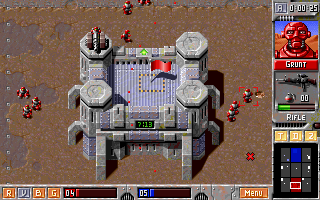
Cannon Fodder 2: Once More unto the Breach, or simply Cannon Fodder 2, is an action-strategy shoot 'em up game developed by Sensible Software and published by Virgin Interactive for Amiga and MS-DOS in November 1994. The game is the sequel to Cannon Fodder, a successful game released for multiple formats in 1993. The game is a combination of action and strategy involving a small number of soldiers battling through a time-travel scenario. The protagonists are heavily outnumbered and easily killed. The player must rely on strategy and heavy secondary weapons to overcome enemies, their vehicles and installations.
The game retained the mechanics and gameplay of its predecessor but introduced new levels, settings and graphics. Former journalist Stuart Campbell designed the game's levels, making them harder and more tactically demanding, as well as introducing a multitude of pop culture references in the level titles. The development of the game's plot was hampered by budget constraints and the resulting lack of explanation confused reviewers. Critics enjoyed the gameplay retained from the original Cannon Fodder but were disappointed at the lack of new mechanics or weapons, comparing the game to a data disk. Reviewers praised the game's level design, though less so those of its alien planet. Critics gave Cannon Fodder 2 positive reviews but lower scores than its predecessor and gave mixed criticism of the new theme music and increased difficulty.
From Wikipedia's article Cannon Fodder 2, licensed under CC BY-SA 4.0
Controls
This is a PC game: it uses the keyboard the way it did under MS-DOS, and the mouse where the game supports it. Click the game screen first so it gets your key presses.
Many DOS games start with a menu or ask a question first — read the screen and answer with the keyboard. Arrow keys, Enter, Space, Ctrl and Alt are the usual game keys.
Live chat
Connecting…
Controls
This is a PC game: it uses the keyboard the way it did under MS-DOS, and the mouse where the game supports it. Click the game screen first so it gets your key presses.
Many DOS games start with a menu or ask a question first — read the screen and answer with the keyboard. Arrow keys, Enter, Space, Ctrl and Alt are the usual game keys.
No reviews yet
We found no critic scores for this game, and too few players have rated it.
Review scorecard
- Graphics — Not scored Unavailable
- Sound — Not scored Unavailable
- Control — Not scored Unavailable
- Fun Factor — Not scored Unavailable
No category score or overall rating is available for the unscored slots.
Comments