Asteroids
114K plays 1979 #Action#Shooter
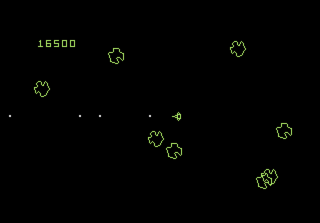
Asteroids is a 1979 multidirectional shooter video game developed and published by Atari, Inc. for arcades. It was released by Taito and Sega in Japan. The player controls a spaceship in an asteroid field which is periodically traversed by flying saucers. The object of the game is to shoot and destroy the asteroids and saucers while avoiding colliding with either or being hit by the saucers' counterfire. The game becomes more difficult as the number of asteroids increases.
Asteroids was conceived and designed by Lyle Rains and Ed Logg, who decided to use hardware developed by Wendi Allen (then known as Howard Delman) that was previously used for Lunar Lander. Asteroids was based on an unfinished game titled Cosmos; its physics model, control scheme, and gameplay elements were derived from Spacewar!, Computer Space, and Space Invaders and refined through trial and error. The game is rendered on a vector display in a two-dimensional view that wraps around both screen axes.
Asteroids was one of the first major hits of the golden age of arcade games; the game sold 47,840 upright cabinets and 8,725 cocktail cabinets, and proved both popular with players and influential with developers. In the 1980s, it was ported to Atari's home systems, with the Atari 2600 version selling over three million copies. The game was widely imitated, and directly influenced Defender, Gravitar, and many other video games.
From Wikipedia's article Asteroids (video game)
Keyboard controls
| Atari 7800 | Player 1 | Player 2 |
|---|---|---|
| D-pad | ↑↓←→ | IKJL |
| Button 1 | Z | N |
| Button 2 | X | M |
| Select | Shift | |
| Reset | Enter | |
| Pause | P |
Hotkeys
- 1 Quick save state
- 2 Quick load state
- 3 Change save slot
Gamepads are detected when you press a button. Remap any key from the emulator’s Controls menu (gear icon).
From the manual, pages 2–3
Live chat
Connecting…
Keyboard controls
| Atari 7800 | Player 1 | Player 2 |
|---|---|---|
| D-pad | ↑↓←→ | IKJL |
| Button 1 | Z | N |
| Button 2 | X | M |
| Select | Shift | |
| Reset | Enter | |
| Pause | P |
Hotkeys
- 1 Quick save state
- 2 Quick load state
- 3 Change save slot
Gamepads are detected when you press a button. Remap any key from the emulator’s Controls menu (gear icon).
From the manual, pages 2–3
2.5 Could be better
Players 60 · 382 votes
No critic scores found for this game: this is the players' rating.
Review scorecard
- Graphics 2.5 out of 5 Overall fallback
- Sound 2.5 out of 5 Overall fallback
- Control 2.5 out of 5 Overall fallback
- Fun Factor 2.5 out of 5 Overall fallback
Overall fallback: Players 60 · 382 votes. The same 60/100 overall rating fills missing categories using the face scale; these are not separate category scores. Player rating; no critic scores available.
What the reviews talk about
Key wordscomplexfun
Comments